Wednesday, 20 February 2013

Facebook in a different color? Nah, just a survey scam


I got messaged about an obvious scam on Facebook:


New Facebook colors!


Strangely enough, that person's Facebook color was still in blue. Is it possible this is just a scam? ;-)


Going to the application:

The application "Pick a col0r" requests your permissions


 Next screen....:
I choose the blue color. Oh, right...


You've won!


As with most applications like these, you first have to fill in a survey to get your Facebook in a different color. Obviously, you still won't be able to even if you have filled in all your information for a chance to win product X or Y.


The application will make the same post on your wall as in the first picture. To remove it:

Go to your privacy settings, applications and remove "Pick a C0lor".


Confirm the removal and check the box. 


 Conclusion

You cannot change the color of Facebook at this point, there is no dislike button, ....

All of these 'applications' point to survey scams where you fill in all your information and your inbox will be flooded with spammail. And no, you haven't won anything.


Wednesday, 13 February 2013

New exploit kit tricks


In today's post, we'll be reviewing a (potentially) new trick by the exploit kit authors.

As usual, it all starts with.... a great portion of spam:

Verizon important account information! ;-)


When clicking on any of the links you get redirected of course.... and some tasty exploits are served.... See for more information on Pastebin links further below....

However, this time, when you don't have a vulnerable Java or Adobe version installed, you'll get redirected (after 61000 milliseconds ~1 minute to be exact) to another page where you can download the brand new version of Adobe Flash Player:


Download the new Flash Player... Note it's not the official Adobe website!


Of course this is not the real Flash Player, in fact, as far as I could find, this version does not exist.

Something that has always bothered me about the download of Flash is the notification circled in red. Yes, on the real website of Adobe, this notification is also present:
"You may have to temporarily disable your antivirus software" --> Great thinking, right?


The bad guys have basically just done a copy/paste of the download page of Flash and changed the version number. When clicking on Download now, you're presented with:


update_flash_player.exe
MD5: 1b7d3393018d65e9d37566089b7626d5
VirusTotal Report
Anubis Report
ThreatExpert Report


The payload seems to be Zeus/Zbot, it also phones home to:
88.190.210.199

Infection URLs from the same campaign, hat tip to @MalwareMustDie :
URLquery search results


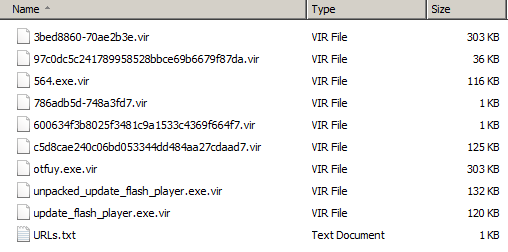
Samples that were gathered, contact me if you'd like a copy:


Pastebin links for the Javascripts:
http://pastebin.com/hhQe6RCP
http://pastebin.com/nt5JmGp3


Conclusion

- Don't click on any link(s) of unknown senders. In fact, don't even open mail from unknown senders
- Patch your Java & Adobe or uninstall it if you don't need it
- Install an antivirus and antimalware product and keep it up-to-date & running
- Use NoScript in Firefox or NotScripts in Chrome


Wednesday, 30 January 2013

Facebook spam leads to Exploit Kit


To no wonders, the Blackhole Exploit Kit is still trying to infect users. One of the techniques commonly used is to send the victim an email from for example Facebook, Linkedin, Twitter, .... Asking to click on a link.

We'll take a small peek at those tactics. We received the following email:

You have received a new comment


Hi ,
You have disabled your Facebook account. You can restore your account at any moment by logging into Facebook using your old login email address and password. Subsequently you will be able to use the site in usual way.
Thanks,
The Facebook Team


Obviously, Facebook didn't disable your account at all. There are some factors to easily determine this email is fake:

  • The 'From' field says it's from "Facebook", however, the sender is clearly 'nondrinker@iztzg.hr'.
  • Have you disabled your account? If not, then there's no reason to receive this mail.
  • The subject and the content of the email do not match.
  • Hovering over the links in the email reveals the real URL, which are not Facebook URLs.


When clicking on any of the links, you are presented (after several redirects) with the Blackhole Exploit Kit (aka BH EK). It tries to load a Java exploit on the machine by firstly detecting which plugin and Java version you are using:

PluginDetect


The payload? Probably ransomware or a Banker Trojan.


You can find the full JavaScript and the infection source on Pastebin :
http://pastebin.com/9PgDTXsb


Prevention

Use the NoScript add-on in Firefox or NotScripts in Chrome to prevent this.
Use the WOT add-on to check on the status of a website.
Use your common sense and ask yourself the proper questions (see below).
Use a URL scanner if you're unsure about a URL. Some examples are VirusTotal, URLvoid and URLquery.


Conclusion

As usual with this kind of emails, be alerted and always ask yourself the proper questions:

Why did this get in my Unwanted Email or Spam folder if I normally get Facebook mails in my normal Inbox?
Why would Facebook send me this when my account isn't disabled at all?
Why are those links not pointing to Facebook websites?
Why is the sender not from Facebook itself? What can I see in the headers?

Use your common sense, update your 3d-party applications as well as Windows, and use a decent antimalware and antivirus product.

Thursday, 17 January 2013

About YouTube top comments


Have you seen  the top comments on YouTube recently? Mostly, they're about the videoclip itself, or about other artists that do not live up to the talent of said videoclip ;-) .

Sometimes, however, spam reaches the top comments (whether or not with a lot of upvotes):
Another user is being addressed, "confirming" the site is real


I've seen this kind of Youtube spam unfold into 2 scenarios:
1) The usual survey scams, promising an iPad for example
2) The download of adware or a PUP (Potentially Unwanted Program) to your machine


Let's take a look at both scenarios, we will go more in depth about the second one, as it is the most interesting. This post includes prevention methods, a removal process and a conclusion at the bottom if you want to skip the investigation.


Investigation


1) Survey scam

As seen in above picture, another user is being addressed. This user did not make any comments on the video at all. I'm guessing they use this little trick to 'confirm' someone asked about it and they are 'just helping out'. The comment has several upvotes as well, thanks to the use of bots.

Clicking on the bit.ly link, you are being redirected to another website:
hxxp://alllightsfull.info/prize/prize.html
2/30 - URLvoid Result
2/33 - VirusTotal Result
AllLightsFull.info - Whois Record

Screenshot:
Congratulations! You won a... Survey scam!


After clicking on Start Now!, you'll get redirected to fill in a survey for a chance in winning an iPad... Which will redirect you to another survey... To another survey.... Until you need to fill in personal details such as your email address. In my case, I had to subscribe to about 20 other instances (read: Brace yourselves, spam is coming) to win the iPad.

 Obviously, you won't win anything and your email address will end up on several spamlists.


 2) Adware / Potentially Unwanted Program

In this scenario, you end up on a different website, but with a similar, easy layout:
Download Youtube videos with "YouTubeSaved"


Some information about the website:  
hxxp://www.youtubesaved.com 
1/30 - URLVoid Result
0/34 - VirusTotal Result 
YoutubeSaved.com - Whois Record

You can download from Download.com/CNET or directly via their website. I'm not sure what's worse: the fact that you can download this beautiful piece of crap via CNET or that it's Norton/VeriSign Secured.

The following file is downloaded:
cid_185425_sono.exe
Result: 3/46
MD5: a3675a8439b09049a76da7f9c93c4a34
VirusTotal Report
Anubis Report
ThreatExpert Report


In the following minutes, I got several new screens to install additional software:
FLV Media Player coming along with WhiteSmoke


FLV Media Player coming along with PriceGong, Freetwittube,...


Some readers might remember WhiteSmoke from a few years ago, when it came bundled with a rootkit and was particularly annoying as well as hard to remove.

While I was eagerly clicking Next on all of the screens, there were a few connections. In fact, in those 5 minuts of installing FLV Media Player, (and thus also: Yontoo, Relevant Knowledge, Free Ride Games, Moyea, Remote Programs, PriceGong, Conduit and WhiteSmoke) there were about 1140 outbound HTTP requests installing even more adware.

If you're interested in these connections, I have uploaded a Fiddler log to Pastebin:
http://pastebin.com/QxcHca1Z


Interesting to note is that Firefox gave a warning about a particular toolbar:
https://addons.mozilla.org/en/firefox/blocked/i226
From that page:
This add-on is silently side-installed by other software, and doesn't do much more than changing the users' settings, without reverting them on removal.

Actually it does more than that, it redirects your searches (through ad-sponsored networks), changes your homepage, annoys you with pop-ups, .... This does not solely apply to WhiteSmoke.

A total of 63 newly created PE files was found on my machine. Seems like they really wanted me to install as much toolbars and adware as possible. Sometimes, besides being referred to as a PUP or adware, this kind of software is called foistware.

You can find a Pastebin here with all VirusTotal results:http://pastebin.com/87HspUgu


Prevention

Now, how do we prevent these applications from ever entering our system? Here are a few tips:

  • Carefully consider what you are installing. Is this program known at all? What does it do? Do I really need this installed? A simple Google search reveals a lot of answers.
  • Don't click Next, Next, Next or OK to everything or in any of the screens you get. This is a golden rule in general.
  • Read the EULA. No wait, what? Those EULAs are always way too long! That's right, luckily there's a tool available which can assist us in identifying unwanted behaviour. The tools is called EULAlyzer, by the same developer as SpywareBlaster (which also helps prevent these).

    I did a scan on a EULA from PriceGong which uncovered the following results:
    EULA states advertising, your searches being submitted and more


  • Use the extension WOT (Web of Trust) to get a second opinion about website X or Y.
  • If you encounter a link that is shortened (for example bit.ly, t.co, tinyurl, ....) you can use a website as GetLinkInfo or Unshorten to acquire more information on that link. Awesome!


Removal

Of course, it might be too late for some users. They are already seeing pop-ups everywhere, getting amazing deals or are getting redirect in their search engines. Again, you can find some hints:

  • Most of these programs can be easily removed via the Control Panel > Add/Remove Programs. There's also a small guide by Microsoft on how to do that. After uninstallation, these programs will open your browser and offer to reinstall the "product". Just close the browser when that happens.
  • "I removed these programs but am still getting redirected. Why?"
    Probably the Add-On, Extension or Plugin is still installed and active in your browser. Remove or disable this manually by following these steps:
    Removing extensions from Internet Explorer
    Removing extensions from Mozilla Firefox
    Removing extensions from Google Chrome

    Restart your browser afterwards and confirm the changes. It's possible you need to manually reset your homepage as well.

  • "Not everything is gone and I don't see anything in the Add/Remove Programs."
    When this happens, you can use a tool like AdwCleaner. Please keep the following in mind:
    - Close all browsers before executing AdwCleaner
    - Click on Search. A logfile will open. Review this carefully! AdwCleaner is pretty strict in removing adware. Then, you can select delete to delete all the unwanted/malicious entries.
    - More information can be found on the download page of AdwCleaner (see above).
  • After following these steps, use your already installed Antivirus and perform a full scan. When that's finished, you can also use Malwarebytes to perform a Quick Scan and ensure everything is gone. Be sure to select in the Settings tab > Scanner Settings that PUPs are shown in the scan results.
  • If you are having difficulties or are not too sure of following these steps all by yourself, you can always make a post on one of the several forums out there specialized in removing malware and other nonsense from a machine. An example forum where you can get help is BleepingComputer.


Conclusion

After reading this post, I'm sure you can now differentiate the thin line between goodware and foistware, adware, or Potentially Unwanted Programs. With the tips above, you should be able to weapon yourself against this kind of threats.

Some legit programs like Java or Adobe also offer these "toolbars". Don't be fooled! The same above rules should be applied here. Tick off those boxes and read carefully through the installation wizard! Why are these things still around you might ask? There's an interesting article here by Ed Bott:
Why does crapware still exist? Follow the Silicon Valley money trail

You might wonder why your antivirus didn't ring any bells when installing this software. The easy answer is: it is hard to differentiate if this is malicious behaviour, as the users consents and agrees on the EULA - which is basically an agreement to all these unwanted modifications!
The hard and longer answer is something to discuss in a future blogpost.

Conclusion: don't install something when you have no idea what it is or does. Google can be your friend.


Wednesday, 14 November 2012

Diablo account phishing


Do you love the smell of phishing in the morning? I surely don't. In today's post we will be reviewing a phishing attempt for Diablo or Diablo III.

The following mail ended up in my mailbox:

You need to login as soon as possible to avoid account closing

There are other, less fancy examples:

Same trick as in the previous example. You need to "verify" your account


Subjects of the mail can vary, but these are the most common:
- Blizzard Notification About Diablo III Account
- Diablo III Account-Notice
- Diablo III Account - login validation‏
- You must verify your identity as the registered account .World of  Warcraft - Diablo III account (s).

The introduction in the email reads:

Greetings!   It has come to our attention that you are trying to sell your personal Diablo III account(s). As you may not be aware of, this conflicts with the EULA and Terms of Agreement. If this proves to be true, your account can and will be disabled.  It will be ongoing for further investigation by Blizzard Entertainment's employees. If you wish to not get your account suspended you should immediately verify your account ownership.


Let's move on to the actual link in the phishing mail. When clicked you'll land on the following page:

An exact copy of the real login page at Battle.net


Below you can find the list of URLs I've gathered in the past days, do not visit any of them as they may harm your computer (or even worse, your Diablo account ;-) ).

hxxp://battle.net.noreply-login.com
hxxp://cn15mcc.com
hxxp://eu.diablo.net.account.oy-login.in
hxxp://eu.diablo.net.account.ts-login.in
hxxp://eu.diablo.net.ca.zx-login.in
hxxp://eu.diablo.net.jiagedi.info
hxxp://eu.diablo.net.tianzhou58.info
hxxp://us.battle.com.wwowus.com
hxxp://us.battle.net.aacc.cn.com
hxxp://us.battle.net.cacc.cn.com
hxxp://us.battle.net.ccus.asia
hxxp://us.battle.net.ddeu.asia
hxxp://us.battle.net.eacc.cn.com
hxxp://us.battle.net.en.oo-rs.com
hxxp://us.battle.net.en.qq-rs.com
hxxp://us.battle.net.en.uu-rs.com
hxxp://us.battle.net.facc.cn.com
hxxp://us.battle.net.ffus.asia
hxxp://us.battle.net.gacc.cn.com
hxxp://us.battle.net.ggwow.asia
hxxp://us.battle.net.hhwow.asia
hxxp://us.battle.net.iacc.cn.com
hxxp://us.battle.net.iieu.asia
hxxp://us.battle.net.jacc.cn.com
hxxp://us.battle.net.kacc.cn.com
hxxp://us.battle.net.lacc.cn.com
hxxp://us.battle.net.llus.asia
hxxp://us.battle.net.login.en.ddus.asia
hxxp://us.battle.net.login.en.yykiki.com
hxxp://us.battle.net.login.en.zkiki.com
hxxp://us.battle.net.ok.jjweb.asia
hxxp://us.battle.net.ok.kk-rs.com
hxxp://us.battle.net.ok.qw-rs.com
hxxp://us.battle.net.ok.uuweb.asia
hxxp://us.battle.net.ok.yywow.asia
hxxp://us.battle.net.pacc.cn.com
hxxp://us.battle.net.ppwow.asia
hxxp://us.battle.net.qacc.cn.com
hxxp://us.battle.net.racc.cn.com
hxxp://us.battle.net.rreu.asia
hxxp://us.battle.net.tacc.cn.com
hxxp://us.battle.net.uacc.cn.com
hxxp://us.battle.net.uuwow.asia
hxxp://us.battle.net.w.llweb.asia
hxxp://us.battle.net.wacc.cn.com
hxxp://us.battle.net.w-u.asia
hxxp://us.battle.net.xacc.cn.com
hxxp://us.battle.net.yacc.cn.com
hxxp://us.battle.net.zacc.cn.com
hxxp://us.battle.net-bizzard-d3-com.account-com.net
hxxp://us.diablo.net.en.rk-login.in


Most of the domains seem to be set up by the same person, someone named "Jin Yu":
Registrant Contact:
   Jin Yu
   Yu Jin jinyu2000@yahoo.cn
   +86.324242434233 fax: +86.324242434233
   ShengLiLu
   Shangraoshi Jiangxi 610041
   CN

Other email addresses associated with Jin Yu:
329409115@qq.com
service@511web.com


Almost all of the IP addresses are originating from China. The hosting companies are as follows, and seem to not care (or know) that malware and phishing pages are set up:

Beijing Weishichuangjie Technical Development Co. - IPvoid Result
DEEPAK MEHTA FIE - IPvoid Result
New World Telecom Ltd., Hong Kong - IPvoid Result
XIN XIN LING - IPvoid Result


Thanks to IPvoid you can easily see other sites hosted there, seems there is more of the same. (read: more malware & phishing pages are hosted)


Conclusion

Stay away from phishing mails like the ones pointed out in this post. There are several variants, some more graphical than others, but in the end they serve the same purpose:
Trying to steal your login credentials!

I'm sure that even when you open the mail, alarm bells should be going off if you simply check the URL, it's pointing to another address than the usual login page.

To be clear, the real webpage to login for your Battle.net account is:
https://battle.net/login/en/

If you're ever in doubt, visit the website directly and do not click on any links in emails from unknown senders. Use add-ons like WoT and/or NoScript to stay protected against these types of threats.
You can also use the URL scanning services at VirusTotal or URLvoid to double-check a URL.


Thursday, 18 October 2012

UPS spam downloads malware


Yes, you've read the title right. Not the usual spam/malware attachment, but in fact just a picture of UPS... which of course is clickable.

But wait! Seems like the bad guys forgot a letter in their HTML (facepalm). I received the following mail:

Subject of spam email: UPS #Print your postal label


Since they forgot the "h" in "http", the image is incorrectly displayed. What it should have been:

Your package was not delivered. You are asked to print the label 


The mail  is coming from (related to the Asprox botnet):
70.75.216.19 - IPVoid Result

What happens when you click on the "Print a shipping label" (or what it should have been):

Copy_of_UPS_Label.zip

A ZIP file gets saved, but you still need to open it and execute the file to become infected...


Copy_of_UPS_Label.exe


Result: 13/43
MD5: 2e9755cfce544627fbfd3be07af5d7d9
Anubis Report
Malwr Report
ThreatExpert Report 


If the file gets executed, it drops a copy of itself to the %appdata% folder and tries to connect to the following IPs:

46.105.112.99:8080 - IPVoid Result
50.22.136.150:8080 - IPVoid Result
78.46.31.53:8080 - IPVoid Result
173.224.211.194:8080 - IPVoid Result
178.77.103.54:8080 - IPVoid Result
184.154.20.226:8080 - IPVoid Result
188.165.212.160:8080 - IPVoid Result
202.169.224.202:8080 - IPVoid Result
217.160.236.108:84 - IPVoid Result


Also when executing the file, an instance of svchost (malware injected into it, thanks to SteveK for the headsup) gets started and opens an empty Notepad file:
Empty Notepad file created by the malware


If anyone has an idea on the why of this,be sure to let me know. Maybe to convince you it's really a UPS label after all? Second fail of the day, should have at least included some rubbish text in there.

This malware is known as Kuluoz, which can download and install additional malware on your system.


Conclusion


Pretty simple. Never open any emails from unknown senders, do not click on any links and certainly do not open any attachments.

Bells should be ringing already when you have not ordered anything. Always be wary when receiving mails where you need to click on a link or open an attachment to view this or that. Ask yourself:
"does this look legit?" If the answer is no, you know what to do.


Monday, 8 October 2012

Worm spreading through Skype and Messenger


Since Saturday, there's a worm actively spreading through (mainly) Skype as well as Messenger (Windows Messenger, Microsoft MSN Messenger).

Someone who's infected with this worm will send you the following message:

Message in German asking to check your cool pictures


The link refers to goo.gl and is actually Google's URL Shortener service. You'll land on Hotfile.com, which is a legitimate file sharing website. (it's not the first time Hotfile has been used to spread malware, read more here. The file has already been removed by Hotfile.)

Links refers to Hotfile and will immediately download a ZIP file.


Positive thing is that it is a ZIP file and not an EXE. This means the user still has to manually unpack and run the malware. Inside our ZIP file we'll find the following file, which is covered as a Skype setup file:

Looks like the real deal. But it's not.


When executing this file, another file (a random 4 character EXE) will be dropped to the %appdata% folder of the currently logged on user:

The icon suggests it's uTorrent. But it's not.


This file will try to connect to api.wipmania.com, waiting for instructions. Additionally, it tries to connect to the following IP addresses:

74.208.112.178 - IPVoid Result
87.106.98.157 - IPVoid Result
199.15.234.7 - IPVoid Result
213.165.71.142 - IPVoid Result
213.165.71.153 - IPVoid Result
217.160.108.147 - IPVoid Result

Now, how do we know how it spreads and which messages it can display? The file extracted from the ZIP archive - skype_05102012_image.exe looks for the following processes:
msnmsgr.exe
msmsgs.exe
skype.exe


It will then automatically send a message, based on the OS language. It uses the following list to spread:
tas ir jusu jauna profila bildes?
seo do grianghraf prl nua?
ont uusi profiilikuva?
nai aft a fotografa profl sas?
sa kvo profili lusankary aquesta
s la teva nova foto de perfil?
hey ito sa iyong larawan sa profile?
hey lanh tieu cua ban?
hey ini foto profil?
hei zhni de gn zilio zhopin ma?
ni phaph porfil khxng khun?
hej er det din nye profil billede?
hej je to vasa nova slika profila?
hej je to tvuj nov obr zek profilu?
hei er dette din nye profil bilde?
hey la tua immagine del profilo nuovo?
hej to jest twj nowy obraz profil?
hej jeli ovo vasa nova profil skila?
hey bu yeni profil pic?
hej detta är din nya profilbild?
tung, cka paske lyp ti nket fotografi?
moin , kaum zu glauben was für schöne fotos von dir auf deinem profil
hey is dit je nieuwe profielfoto?
ez az j profil ksta tu foto de perfil nuevo?
hey essa sua foto de perfil? rsrsrsrsrsrsrs
hey c'est votre nouvelle photo de profil?
hoi schoni fotis hesch du uf dim profil ppe n
lol is this your new profile pic?


It will then add the link and subsequently adds your username after the equals '=' sign :
http://goo.gl/QYV5H?img=


Let's take a closer look at the files:

skype_05102012_image.exe
Result: 23/44
MD5: 98f74b530d4ebf6850c4bc193c558a98
Anubis Report
Malwr Report
ThreatExper Report


36A9.exe
Result: 16/44
MD5: 0d4b7f4c1731c91dff56afce0ecf37c5
Anubis Report
Malwr Report
ThreatExpert Report


The malware is commonly identified as Worm.Dorkbot and Worm.Agent or Generic Trojan.

Microsoft provides a description:
Win32/Dorkbot is a family of IRC-based worms that spreads via removable drives, instant messaging programs, and social networks. Variants of Win32/Dorkbot may capture user names and passwords by monitoring network communication, and may block websites that are related to security updates. It may also launch a limited denial of service (DoS) attack.

On my testmachines there was no additional malware downloaded, even after replicating a few times. Several variants of malware can however always be downloaded, whether it's ransomware, rogueware....


Conclusion

Worms spreading through Facebook, Twitter as well as IRC, MSN and Skype is nothing new. Still, it appears to be very successful as human curiosity wins in cases of doubt:
"Do I really have (embarassing) pictures of myself on this website? Better take a look!"

No, no, no!

Never click on unknown links, especially when a URL shortener service like goo.gl is used. (others are for example t.co, bit.ly, tinyurl, etc.)
Don't be fooled by known icons or "legit" file descriptions, this can easily be altered.

Even if you clicked the link and you're not suspicious, you should be when a file is downloaded and no pictures are shown, but just an EXE file.

For checking what is really behind a short URL, you can use:
http://getlinkinfo.com/
http://longurl.org/

For checking whether a file is malicious or not:
https://www.virustotal.com/
http://virusscan.jotti.org/


Display Color Calibration tool DCCW and UAC bypasses

In today's post we'll look at yet another way to bypass UAC using the Display Color Calibration tool, hereafter referred to as ...