Thursday, 24 October 2013

PHP.net compromised


Unless you didn't have any internet access today, you must have heard about the compromise of PHP.net today. An excerpt:

One of the first confirmations that PHP.net is was in fact compromised


Google Safe Browsing warning


You can read the full discussion on whether PHP was compromised or not here:

Statements by PHP.net itself:
I think it's pretty clear by now how it (could have) happened: insertion of a malicious - or change of- a Javascript file on their website.

Let's start with the first entry of infection, most likely userprefs.js on the main page. Some heavily obfuscated Javascript is present, which redirects to either:
Redirects


Here's a Pastebin link containing the modified userprefs.js: http://pastebin.com/yZWxxk2h

After either of those redirects, PluginDetect (which is a legit Javascript library to detect browser plugins) determines your version of Adobe & Java. If you have any of those vulnerable versions installed, you'll get served with several flavors of malware. Your browser will either crash or "hang" for a while.

Interestingly enough, another PluginDetect was also trying to check for vulnerable versions of VLC, SilverLight and Flash.

If you don't have any of these installed, you're possibly being redirected to a website with the text "He took over Russia with a wooden plough, but left it equipped with atomic weapons" (seems to be a letter about Stalin, see here) which contains the following fancy YouTube video:
http://www.youtube.com/watch?v=9Mnmhtr4ThE


Let's move on to the actual payload. Thanks to a blogpost by Barracuda Labs, I was able to download the PCAP file they gathered. 


The PCAP file proved to be very interesting. Besides being able to pull the usual malicious Javascript files, I was able to gather some payloads as well, which aren't very friendly to your machine.

The following malware was seen to be downloaded: Fareit, ZeroAccess (GoogleUpdate/Google Desktop variant), Zeus and even ransomware (unknown) in one instance!

Fareit and Zeus/Zbot have been known for going hand in hand for some time now, see here for an earlier blogpost. When executed, you'll either have to pay up a fine (ransomware), get a rootkit (ZeroAccess) or get your information stolen (Fareit & Zeus). An overview of the information that will be stolen:

Your data being stolen


I don't need to mention that this is quite bad. Have you visited PHP.net yesterday or today and saw your browser crash? Did you notice any strange behavior? Yes? No? Either way, perform a scan of your machine right away. We'll get back to that though.

MD5s of samples gathered:
c73134f67fd261dedbc1b685b49d1fa4
406d6001e16e76622d85a92ae3453588
dc0dbf82e756fe110c5fbdd771fe67f5
78a5f0bc44fa387310d6571ed752e217
18f4d13f7670866f96822e4683137dd6

Callbacks:
85.114.128.127


Prevention

  • Patch your Java & Adobe or uninstall it if you don't need it.
    Same goes for their browser plugins or add-ons!
  • Keep your browser of choice up-to-date.
  • Install an antivirus and antimalware product and keep it up-to-date & running.
  • Use NoScript in Firefox or NotScripts in Chrome.
  • Block the above IP. (either in your firewall or host file)


Disinfection 


  • Perform a full scan with your installed antivirus and a scan with another antivirus or antimalware product. You can check on VirusTotal which antivirus applications already detect this malware.


Conclusion

  • Every website can be injected with malicious Javascript, even well-known websites!
  • Received a Google Safe Browsing warning? Don't simply ignore it, either look up if anything's known about that website being hacked or if you're not sure, stay away from it for a while. (best case is to contact the site owner as well.)


Twitter account suspended


This is just a small post to indicate that my Twitter account was suspended last week. (15 October 2013)
(don't worry, if you haven't been following, it's back up already since the 18th)

I received the following mail from Twitter:
Mail from Twitter


My account was inaccessible until the 18th of October, when they "un-suspended" it. Luckily my followers & following were recovered. As to this date, I haven't had any reply from Twitter, despite replying to their ticket.

As to the cause of my suspension? I'm unsure. I often tweet about malicious things, but I do keep maliciours URLs out of them, even obfuscated ones. (easier just redirecting on Pastebin)

I have noticed however that I was tweeting about an account which was massively spamming Twitter. That tweet is still deleted. Not sure if it had anything to do with it, but I don't see too many other possibilities.


It appears I'm not the first to have had this situation. Mikko Hypponen from F-Secure had it as well somewhere in 2009:


You can't send any links in DMs anymore, so I guess Twitter is getting more restrictive. Which is a good thing. I just hope they won't produce any more false positives ;-) .

Michael Krigsman from ZDNet had also written a short article on Mikko's suspension:
http://www.zdnet.com/blog/projectfailures/twitter-suspends-security-researchers-account-as-a-threat/6327


I will update when I receive any news from Twitter.

Friday, 11 October 2013

Funny Facebook files deliver malware


I've recently got notified on an interesting malware campaign. I'll start with some screenshots:


Save the file and run! It is funny :)

DivX plug-in Required!


Download and execute the facebook app, please!


Some examples of files that can be downloaded:
IamFunnyPNG-facebook.com
IamFunnyPNG-fb.com
IamNakedBMP-facebook.com
IamNiceTIFF-fb.com
IamSexyPIC-fb.com
IamSexyPNG-fb.com
MeBitchTIFF-fb.com
MeFunnyJPG-facebook.com
MeNakedJPEG-fb.com
MeNakedPIC-facebook.com
MeNiceGIF-fb.com;
MeNicePNG-fb.com
MeSexyJPEG-facebook.com
MeSexyPNG-fb.com
YouNakedJPG-fb.com
YouNiceBMP-facebook.com
YouSexyJPEG-fb.com
YouSexyPIC-facebook.com
YouWhoreJPEG-facebook.com


I think you get the point here. Users are being socially engineered to download a file that seems to originate from Facebook. The file is supposed to be an image file (PNG, TIFF, BMP, JPEG and even "PIC") but is in fact an executable. The initial landing page also ends in names of females, for example "laura.html" or "birgitta.html" .


Let's take a look at one of the downloaded files:
IamWhoreJPG-facebook.com
MD5: 1273f3ea6ae76340270bab57b073b0b5
Anubis Result
Malwr Result
VirusTotal Result


Unfortunately I was unable to execute the malware, as I currently don't have a physical machine to test it. According to VirusTotal results, it may be a Trojan called Yakes or Tobfy:
Trojan:Win32/Tobfy is a family of ransomware trojans that targets people from certain countries. It locks your PC and displays a localized webpage that covers your desktop. This webpage demands the payment of a fine for the supposed possession of illicit material.

Some variants might also take webcam screenshots, play an audio message pretending to be from the FBI, closes or stops processes or programs, and prevents certain drivers from loading in safe mode - possibly to stop you from attempting to disable the trojan.
See: https://www.microsoft.com/security/portal/threat/encyclopedia/Entry.aspx?Name=Trojan%3AWin32%2FTobfy

According to Ydklijnsma, this specific campaign drops bitcoin miner malware. See:
There's a good blogpost by Brian Krebs on the subject of bitcoin mining malware:
http://krebsonsecurity.com/2013/07/botcoin-bitcoin-mining-by-botnet/


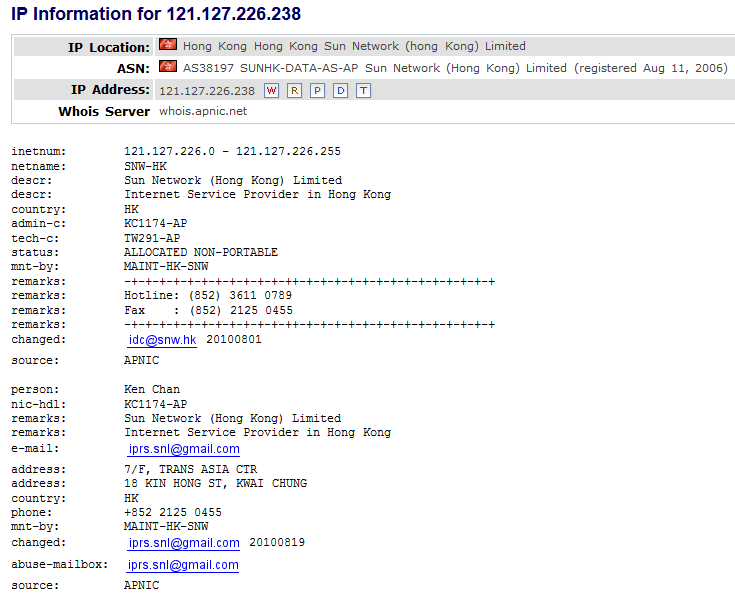
Most of the malware seems to be hosted via the domain registrar "Hong Kong Sun Network":
Hong Kong Sun Network - hosting multiple malicious websites


Some IPs that are involved - next to it their abuse contacts:


I'm betting it's safe to assume the worst and block these IPs (more investigation is needed though):
91.218.38.0/24
103.9.150.0/24
109.73.166.0/24
112.213.106.0/24
121.127.226.0/24
188.190.120.0/24

Most of the sites use the pattern described here:
If you're interested in some of the websites that are serving this malware, visit the following Pastebin:
http://pastebin.com/raw.php?i=8BqGPvhX
Note that links may still be live! 


Conclusion


  • Don't be fooled by websites that seem to resemble Facebook, always check the URL you are currently on before downloading or executing files
  • Install an antivirus and antimalware product and keep it up-to-date & running
  • Use a linkscanner to verify the integrity of a link on either http://www.urlvoid.com or https://www.virustotal.com/
  • Use NoScript in Firefox or NotScripts in Chrome to block malicious attempts on unknown sites
  • Running "funny Facebook files" will usually provide you with everything but fun


Wednesday, 11 September 2013

Malware: the blame game


As you may know, there's a never-ending debate between who's at fault when a user is infected:
  •  is it the user for being "gullable" or being social engineered to click on a malicious link?
  •  is it the fault of the antivirus or antimalware application for missing an infection?
  •  is it the fault of the administrator in corporate networks for not having proper policies?
  •  last but not least side-question: is antivirus useless?

Here's an excellent article which goes deeper into these questions and discusses about it:
http://www.welivesecurity.com/2013/01/03/imperva-virustotal-and-whether-av-is-useful/
(TL;DR: Imperva performed an antivirus test with doubtful and possibly improper testing methods and the (antivirus) community reacted on it)

My personal opinion? There's only one group to blame here which seems to get missed in these debates: the malware writers themselves. After all, the people who create (and use) the malware are responsible for the millions of infected machines and affected businesses, which may both lose a considerable amount of money by either
  • users: paying up to ransomware or rogueware, or CC (Credit Card) theft or fraud
  • businesses: personal records stolen (user/password databases), business plans stolen, not to mention the financial & productional losses.

So what's the endless discussion about and why are we not blaming the malware authors and botnet operators? (to learn more about botnets see my blogpost: the botnet wars: a Q&A)

Here are the main points antivirus companies are blamed on:
  • making money on the back of the customer and 
  • not protecting well enough.  

How much of this is true? Is antivirus dead? My only comment about this:
antivirus provides a good (basic) layer or level of protection on your machine. Is it sufficient? Maybe. Do you need extra protection? Depends. If you're a normal "home user", an antivirus and firewall will surely suffice. Free or paid antivirus doesn't really matter at that point. If you're in an organisation or corporation, antivirus will surely provide a good base to start from, not only signature-based but heuristically as well.

But you'll need more. Ideally, you need an extra set of eyes just for monitoring unusual behavior in your network. Is this realistic? Maybe. Are there solutions specifically designed for this on the market? Yes.

I won't go any deeper into the points above, as it's been discussed & debated upon many times.

Moving on:

Do ISPs (Internet Service Provider) need to take an arrow in the knee for this? How many and which ISPs are already detecting machines which are infected? These are newer and interesting questions as well. ISPs are obviously not responsible when a user is getting infected, however... When that machine in question starts sending out quite a lot of traffic (zombie), does the ISP need to take action?

In my opinion, if there's indeed an unusual load of traffic coming from a machine (sending out mass emails, trying to DDoS a box, ...) the ISP should indeed warn the user.

Some ISPs already do this, for example:
CenturyLink, KPN, Time Warner, Xs4All, Ziggo, ...

Getting back to my original point. Whenever there's a big "outbreak" of malware or there's a so called "APT" (Advanced Persistent Threat) found, people from several branches of the industry are very fast to point fingers or play the blame game (hence the title of this post). Examples:


  • You have no proper security implementations!
  • Your $securitysolution sucks! (use ours!)
  • You(r employees) are easily fooled!
  • You use Windows!
  • ...


It so appears that every single person is forgetting the simple fact that malware writers are actually the cause of one's computer issues. Not antivirus. Not Microsoft. Not the user. Not the ISP.
You can basically view these as buffers. Buffers against the malware. Buffers against the bad guys. Yes, you reading this now, you're actually a buffer as well! Do you have any idea on how often companies are suffering from attacks? How many attacks are actually prevented by $securitysolution, sysadmins and even users?

So, let's state it clear for once and for all. There's only one entity to blame:
the malware writer / botnet operator / put-other-synonym-for-bad-guy-here

Why am I using the word "entity" you may wonder? Well... You must know that malware writer and botnet operator aren't actually synonyms (as opposed to suggested above). The malware writer isn't necessary a botnet operator or the other way around. One thing's for sure though: they both take the blame here.

The malware writer for creating and distributing the malware in the first place.
The botnet operator or herder for consequently infecting users.

Here's a simple flowchart I made about how the current "blame" situation is:
(the direction of the arrow indicates who is blaming who)

Note: may differ from current view


An ideal flowchart would be:


An ideal world?


I propose a new model. One where nobody gets the blame, except for the malware writer malicious entity.


A model where nobody points the finger to the user, which seems to happen in quite a lot of the cases. 

Indeed, a joint effort is necessary in this particular subject. It requires effort from all the involved parties. 


We'll start with each and go build our foundation, our basis:


The user:

  • Should know his or her responsibility and consequences when browsing the web
  • Should install an antivirus & firewall (free or not is irrelevant, as long as both elements are present)
  • Should know there's no 100% protection. There's a maximum of 99(,9?)% protection at least.
  • ... That's basically it.

The antivirus vendor:

  • Should acknowledge the user.
  • Should know the user's needs and shortcomings
  • Should know there's no 100% protection. There's a maximum of 99(,9?)% protection at least.
  • ... That's basically it.


The security company:

  • Should acknowledge both the user and the antivirus vendor
  • Should keep giving feedback for both instances
  • Should acknowledge the cat and mouse game between "viruses" and "antiviruses"
  • ... That's basically it.


Microsoft:

  • See The antivirus vendor and The security company


The 3rd party app:

  • Should acknowledge the user
  • Should know the user's needs and shortcomings and therefore:
  • Simplify the processes while increasing the security (not easy, I know)

That's basically it. If by now you're still thinking things like "users are gullible", "X antivirus is really bad", "Y security company is really lacking", "Windows is filled with vulnerabilities", "Java, Adobe, etc. are so easily exploited", .... Then you missed the point of this post. Start again from the top.

The foundations suggested above are what they are, foundations, and is how I see it. Your foundations may differ depending on the situation you're in, but in the end we're all in the same situation:

"fighting the malicious entity".


That is why there's a need for cooperation, coordination. There are countless possibilities, but to give a few examples for a kick start (for once let's get a step ahead of the bad guys):

The 3rd party app:

Not too many options here, besides:
  • listening to feedback from security companies and researchers and
  • prioritize security and provide sufficient information about security patches.

Microsoft:
  • Continue the cooperation that currently exists between security companies and others
  • Share your research, especially new malware trends. Everyone benefits!

The security company:
  • Continue the cooperation that may currently exist between you and other companies
  • Found anything interesting? Don't hesitate to share. 

Note: I realize there are sometimes reasons specific findings or research may not or cannot be shared. Obviously these specific situations should not be shared then. If you're in this industry, I'm sure you'll know why. An alternative some companies are applying is simply not naming who or what has been affected, but still outlining the incident, solution approach and solution on itself.


The antivirus vendor:
  • Consolidate your resources. There are countless researchers out there who are simply eager to share their findings, suggestions, research or simple MD5 hashes with you
  • Share your own findings as well when there's an "APT". Do not simply use it for the next big marketing move
  • Share, where appropriate, MD5 hashes so the community can benefit.

The ISP:
  • Warn your customers when you see an unusual and/or malicious high traffic load from end-users

The webhost or hosting provider:
  • Provide clear, useful and enough information on how to send an abuse report

Note: I realize there are more than enough (malicious) webhosts out there which do not list an abuse@ address, provide a fake one or do simply not reply. If you are a webhost, start implementing proper security checks so there's no malware being hosted on one of the websites you provide. Provide an email address or online form where security companies and/or researchers and users can send their abuse reports.


Last, but not least:

Users:
  • Don't panic. Panic is a bad counselor. Stay focused and note down what happened or at least what you noticed or think what happened. What did you do right before the culprit happened?
    Did it turn out your version of Office or Windows is illegal?
    Did you click on a link? Did you pick up a call from "Microsoft Support" but ended up in paying countless dollars/euros/pounds/etc. for a problem that didn't even exist in the first place? 
  • Have you been infected with malware (in particular banking malware or ransomware)? 
  • Were you the victim of CC theft, identity theft or any other form of online fraud or theft? 

Report it to the correct instances. Sadly, I found very little useful websites in regards to those situations. Prevention tips are scattered everywhere, but what to do afterwards, when you sit there and think about what has happened, well, that information is very scarce. What I did find is listed here:


Is this of no useful information to you? Exactly. More resources should be available for this.
"What now?":

  • Contact your local police office and file a "cybercrime" complaint: you're a victim!
  • Consult the website of your local CERT - Computer Emergency Response Team - Often they have additional information or may even have a hotline or contact form to report your incident.
  • ...


Conclusion

In this post I have addressed the current situation in regards of a malware infection and its results. Who is to blame? The answer is simple: the malicious entity. This may sound mysterious but as indicated above, I mean the malware writer and/or botnet operator. You can also call it the "cybercrook" or "cybercriminal" or whatever term best suits your needs.

I have proposed a new scheme, a new situation, a new model where we can all benefit from. Insights have been given and hopefully something can come out of it. As a matter of fact, it all boils down to these 3 points:


  • You are not to blame, only the malicious entity is to blame;
  • Look at yourself before pointing the finger to others who have in fact provided you all these years with resources!
  • Work together. Cooperate. Coordinate. Consolidate. You may call it "the 3 C's".
    Be victorious in your efforts to stop "cybercrime" once and for all!


Originally I had named this blogpost "Responsibility with malware infections", but as the post (yes, you may call it a rant if you like) continued to grow, I realised the current title fits the subject in a more appropriate and understandable way. Though you should still take your responsibilities when this kind of incident happens.


Questions? Comments? Feedback? Suggestions? I'm all open for it. Give me a shout-out on Twitter or simply post a comment below. I'll try to answer as soon as possible.


    Tuesday, 3 September 2013

    PayPal spam leads to malware cocktail


    Interesting spammail in one of the traps today, something wrong with your variables, malware authors? :-)

    Subject: With your balance was filmed - 300 $ -Resolution of case #PP-025-851-848-207


    Content of email:
    ID

    Transaction: {figure } {SYMBOL }

    With your balance was filmed : - 500 $

                                                               -20 $

                                                               -49 $
    ---------------------------------------------------------------------

    Balance is:                                      625 $

    For more information, please see page View all history

    Sincerely,

    Please do not reply to this email. This mailbox is not monitored and you will not receive a response. For assistance, log in to your PayPal account and click the Help link in the upper right corner of any page PayPal.

    Copyright © 1999-2013 PayPal. All rights reserved.

    PPID PP {DIGIT }


    From:  service@int.paypal.com
    Source IP: 96.10.192.31 - IPvoid Result
    Botnet: Cutwail spambot

    Malicious URL (active):
    hXXp://dailyreport.cffy88.com/project/index.htm 


    WhoIs information:
    Domain Name ..................... cffy88.com
    Sponsoring Registrar ............ HICHINA ZHICHENG TECHNOLOGY LTD.
    Name Server ..................... dns29.hichina.com && dns30.hichina.com
    Registrant ID ................... hc590857663-cn
    Registrant Name ................. vinson luk
    Registrant Organization ......... shenzhenshi caifufengyun keji youxian gongsi
    Registrant Address .............. Rm.3-33C Dijingfeng Maoyecheng Dafen Buji, Longgang District
    Registrant City ................. shenzhen
    Registrant Province/State ....... guangdong
    Registrant Postal Code .......... 518000
    Registrant Country Code ......... CN
    Registrant Phone Number ......... +86.075533572855 
    Registrant Fax .................. +86.075584153080 
    Registrant Email ................ vinsonluk@hotmail.com

    More malware is hosted on cfyy88.com as well, including a ZIPfile which is currently empty. (Error from the malware authors? Uploaded too soon, dropper just not included yet?)

    Related websites:
    hXXp://erpii.cn/
    hXXp://jiami99.com/
    hXXp://verp.cc/
    hXXp://greatempire.cn/

    Hosted on: 211.154.134.171 - IPvoid Result 


    Interesting login page


    Other screenshots:


    The link from the spammail loads malicious JAR file:
    MD5: 6b872d170e878ab3749d717cbba5d0e3
    VirusTotal Result
    Exploit-Analysis Result

    Exploit-Analysis is a new service and looks very promising, besides doing the basic stuff (meta-data dump, strings, tcpdump, ...) you can also view the entropy of the malware, as well as choosing browsertype and Java/Flash/Adobe version. In particular for JAR files, it can also display the classes included and thus can be used to analyze a malicious Jar file online (you can do this offline with JD-GUI for example).

    From their website:
    Sandy developed under Indian Honeynet and is capable of doing both static and dynamic analysis of Malicious Office, Jar,HTML files at the moment.


    Continuing with our findings, the following files were downloaded & dropped to the system:
    about.exe    098e44145840862b9488be395c860110   
    index.html   325a20d15d66e5a78878da2ff579a715   
    readme.exe  523a813fa43744673bdb537d778d0e3f   
    w8BDM.exe   5c840a17dcee119cf40a3636971de65c   
    able_disturb_planning.jar   6b872d170e878ab3749d717cbba5d0e3   
    tixy.exe      82f1d0ed26012f0883cb6017aa8fb671   
    able_disturb_planning.php  be3db7ef10eca3a21878cbad80eb5f2d   
    pythias.js   d60b2df2b5c6c1ef083766cba29b60d2   
    JpVsf.exe   f804ad6fe5b2a0ae3078703fdc112e29   


    Besides the usual infostealers (Zbot, Fareit, etc.), Medfos is saying "hello" as well:
    Win32/Medfos is a family of trojans that install malicious extensions for Internet browsers and redirect search engine results. It also allows for click-fraud, generating profit for a website through unethical means.
    Source: http://www.microsoft.com/security/portal/threat/encyclopedia/entry.aspx?Name=Win32/Medfos


    Conclusion


    • Don't click on links from unknown senders.
    • Don't open any attachment(s) of unknown senders. 
    • In fact, don't even open mail from unknown senders.
    • Don't be fooled by mail spoofing, you can view the real source by right-clicking your mail and choosing "View Source". (This depends on your mailclient though.)
    • Install an antivirus and antimalware product and keep it up-to-date & running.
    • When in doubt, visit the website of §vendor or §product or §service directly.
    • Block the IPs mentioned above in your firewall or hostfile or §solution.
    • I almost forgot: uninstall Java.


    Tuesday, 13 August 2013

    Scams, scams everywhere


    It's the scam season. Well, actually scams are always going around. Facebook is pretty popular to spread those scams, for example the Gina Lisa Facebook scam and the scam to have Facebook in a different color.

    There's one recently that caught my attention:

    "This is incredible"


    Basically what happened here is that someone on Facebook clicked on the wrong link, and the event got automatically created. Consequently, all of his/her friends were invited to the event as well.

    Of the 4 pages that showed up in the search results (there are many more), ~500 people clicked on the bit.ly links. Which is not very much, considering how many people got the invite. Most of the comments on the events were "What is this?", so this means most people realised it's fake.

    The CNN logo is being (mis)used, probably to make it look more legit. When you click on the link, you get redirected through affiliates but eventually you land on the following page:


    "Dr. Oz Miracle Diet"


    Websites:
    hxxp://consumerhealthnews9.org  - URLvoid Report
    hxxp://consumerhealthnews6.com   - URLvoid Report

    When clicking on any of the links on those sites, you get redirect to:
    hxxp://ww90.thorizo.net  - URLvoid Report

    More affiliates, more links to click on. The title for this blog post could also have been "affiliates, affiliates everywhere". 


    Removal

    If it seems that you have created the event, simply go to the event page, click the "wheel" icon and choose "Cancel Event":

    Cancel the event


    Be sure to also check your Apps, it's possible you allowed a malicious app to post & create things on your behalf:

    Check your Apps


    If you were invited to the event, simply ignore the message. You can also report the event as scam or spam by clicking on the Report button on the left of the event:

    Report the event


    Conclusion


    To keep it short and simple:
    don't fall for these types of spam/scam, most of the times it's pretty obvious it's fake.

    If in doubt, send your friend on Facebook (or if someone sent you the link) via PM if he or she knows what this is about.

    You can also use a linkscanner to verify the integrity of a link on either http://www.urlvoid.com or https://www.virustotal.com/

    To get some information on a bit.ly (or other URL shortener services) link, you can use any of the following websites:
    - http://www.getlinkinfo.com/
    - http://longurl.org/
    - http://www.longurlplease.com/ (includes Firefox extension)

    To report a malicious bit.ly link use:
    http://bitly.com/a/report_spam

    Wednesday, 7 August 2013

    Malware Puzzle


    A malware (crossword) puzzle you say? Yes! Why not?


    I've made a puzzle about malware (and security) related keywords. It comes in .PNG format, .DOCX and .PDF. You can print it and fill it in and @ me on Twitter: @bartblaze . (or leave a comment)


    I consider the difficulty of the puzzle quite easy, but here are some breadcrumbs:
    •  I only mean a synonym when it's explicitly mentioned
    •  Across is horizontal, down means vertical
    •  The last letter of (2) down is the first letter of (9) down
    •  I must note I made a small error, (5) down is "disaster" when it should have been "doubt" (FUD). So  just fill in disaster there. 
    •  Don't think about it too long (it's not far-fetched)

    To make it more fun you can:

    • Set a time limit to solve the puzzle as I did (10 minutes)
    • Prohibit the use of internet

    There's no prize, it's just for fun. Enjoy!


    Click to enlarge


    .PNG: http://imgur.com/q6MOHlf
    .DOCX: http://www.mediafire.com/?bj886m0oh6sq4d2
    .PDF: http://www.mediafire.com/?flp27zeh1zuu4xm

    Display Color Calibration tool DCCW and UAC bypasses

    In today's post we'll look at yet another way to bypass UAC using the Display Color Calibration tool, hereafter referred to as ...