Tuesday, 15 March 2016
All your creds are belong to us
In the past, I've blogged about Steam Stealers (malware that specifically targets gamers and users of Valve's platform) before (see 1, 2), but this blog post will be a bit different.
Working together with Santiago Pontiroli, Security Researcher at Kaspersky Lab Global Research and Analysis Team, we've written a paper on these infamous Steam Stealers.
Check out our blog post here or directly download the PDF from here.
Enjoy!

Sunday, 21 February 2016
Preventie van ransomware
This blog post will be fully in Dutch. If you'd like to read English material, be sure to check out my Q&A on ransomware. A translation will also be available in one of the next days.
Ransomware heeft in principe geen introductie meer nodig, maar kortgezegd zal deze specifieke soort malware (bijna) al je bestanden encrypteren en een bepaald bedrag vragen (tegenwoordig vaak in Bitcoin) om terug toegang tot al je bestanden te verkrijgen.
Andere benamingen: CryptoLocker, cryptoware, encrypting ransomware.
Deze blog post is opgesplitst in twee luiken: 1 voor thuisgebruikers, 1 voor bedrijven. De meeste tips zijn echter ook uitwisselbaar en kunnen naar believen worden toegepast.
Tot slot worden ook enkele tools ter beschikking gesteld als aanvulling alsook extra resources.
Thuisgebruikers
- Gebruik, afhankelijk van de mailclient, een degelijke anti-spam filter. In zo goed als alle online diensten (bv. Outlook.com, Gmail, ...) wordt deze reeds standaard aangeboden.
- Open nooit een bijlage van een onbekende afzender.
- Blokkeer de executie van macro's in je Office-pakket.
- Schakel Windows Script Host uit. Gebruik hiervoor bijvoorbeeld optie D in mijn tool.
- Schakel PowerShell uit. Dit kan via Configuratiescherm > Programma's >
Windows Onderdelen in- of uitschakelen. - Gebruik een degelijke anti-virus/anti-malware en firewall oplossing en houdt deze up-to-date.
- Verwijder alle oude Java versies, of verwijder Java volledig indien mogelijk.
- Verwijder SilverLight indien mogelijk.
- Installeer steeds alle relevante Windows updates.
- Activeer click-to-play voor Flash in je browser. Dit hangt af van je browser zelf.
- Installeer NoScript of vergelijkbaar in je browser.
- Installeer een adblocker in je browser, bijvoorbeeld uBlock Origin.
- Er is eveneens een freeware programma beschikbaar, dat heel wat zaken voor je automatisch gaat instellen (zoals bekende locaties waarvan ransomware zich start gaat monitoren) genaamd CryptoPrevent.
Last but not least, de twee belangrijkste punten:
- Denk altijd twee keer na alvorens een link of bijlage aan te klikken/te openen.
- Neem geregeld backups! Vergeet niet om na de backup je externe harde schijf los te koppelen. Wees ook voorzichtig met backups naar de cloud - eenmaal je merkt dat je geïnfecteerd bent, verbreek meteen de netwerkverbinding en/of sluit het toestel af om de schade te beperken.
Test ook of de backup geslaagd is en herstel enkele (test)bestanden. Een backup is altijd de beste optie hier om bestanden terug te zetten, maar dan moet je ook weten dat deze gelukt is.
Bedrijven
Ook in bedrijven zijn vele van de bovenstaande tips van toepassing. Het overgrote deel hiervan is ook perfect toepasbaar via Group Policies (GPO).
Enkele aanvullingen:
- Gebruik steeds sterke wachtwoorden voor je servers (ongeacht domain controller of fileserver, etc...).
- Installeer steeds alle relevante Windows updates.
- Schakel indien mogelijk toegang tot RDP uit. Indien dit niet mogelijk is, gebruik een goede firewall oplossing (hardwarematig) met VPN. Gebruik ook hier sterke wachtwoorden/authenticatie.
- Schakel administrator-rechten uit voor gewone gebruikers. De meeste gebruikers met een bedrijfslaptop zouden in theorie geen programma's of dergelijke moeten installeren.
- Schakel via GPO het gebruik van macro's in Office uit indien mogelijk (of sta enkel macro's toe die digitaal ondertekend zijn), schakel Windows Script Host uit en verplicht het gebruik van antivirus.
- Installeer dus ook antivirus op alle toestellen in het netwerk en zeker voor gebruikers die hun toestel mee naar huis (mogen) nemen.
- Indien aanwezig, activeer de optie om gearchiveerde bestanden te laten scannen door de antivirus.
- Installeer een degelijke anti-spam oplossing en verbiedt het gebruik van bijlagen met gevaarlijke extensies (.exe, .scr, ....) maar blokkeer ook JavaScript bestanden (.js).
- Verifieer de file sharing permissies van je gebruikers. Wees hier zo efficiënt mogelijk in. Een gebruiker tot groep X heeft niets te zoeken op de share van groep Y? Beperk de toegang. (maak bijvoorbeeld gebruik van ACLs)
- Informeer gebruikers over de gevaren van het openen van bijlagen van een onbekende afzender of het zomaar losweg klikken op een link in een onbekende mail. Heb eveneens een actieplan klaar voor moest er zich toch een malware-infectie voordoen (ransomware of anders).
- Gebruik policies om EXE bestanden vanuit bepaalde locaties niet toe te staan. Link.
Last but not least, de twee belangrijkste punten:
- 'Failing to prepare is preparing for failure'. Preventie is belangijker dan desinfectie.
- Neem geregeld backups! Vergeet niet om na de backup je externe harde schijf los te koppelen. Wees ook voorzichtig met backups naar de cloud - eenmaal je merkt dat je geïnfecteerd bent, verbreek meteen de netwerkverbinding en/of sluit het toestel af om de schade te beperken.
Test ook of de backup geslaagd is en herstel enkele (test)bestanden. Een backup is altijd de beste optie hier om bestanden terug te zetten, maar dan moet je ook weten dat deze gelukt is.
Tools
Browser:
Gebruik bij voorkeur Internet Explorer of Edge niet - andere browsers zijn namelijk meer 'customizable', wat wil zeggen dat je met een add-on of extensie wat extra bescherming kan instellen.
(vergeet echter niet om deze extensies ook up-to-date te houden)
Activeer click-to-play voor plugins (zoals Flash of Silverlight)
uBlock Origin (Chrome)
uBlock Origin (Firefox)
NoScript
Blokkeer de uitvoering van scripts:
Remediate VBS Worm
Script Defender
CryptoPrevent Malware Prevention:
https://www.foolishit.com/cryptoprevent-malware-prevention/
Java:
Waarom moet ik oudere Java-versies van mijn computer verwijderen?
PowerShell uitschakelen:


Resources
Backups:
Back-ups maken en terugzetten: veelgestelde vragen
Office:
ActiveX-besturingselementen in Office-documenten in- of uitschakelen
Externe inhoud in Office-documenten blokkeren of deblokkeren
Macro's in Office-bestanden in- of uitschakelen
Gebruik makend van GPO:
Identificeer ransomware:
ID Ransomware
Ransomware overzicht:
Ransomware Overview
No More Ransom project (decrypters etc.):
The No More Ransom Project
Ransomware extra informatie:
Ransomware: a Q&A
Windows File Sharing:
Understanding Windows Server 2008 File and Folder Ownership and Permissions
Windows Script Host (WSH):
Disabling Windows Script Host
Tuesday, 2 February 2016
Vipasana ransomware new ransom on the block
Yet another ransomware is going around (since at least the 20th of December), which I've dubbed Vipasana ransomware due to where you need to send your encrypted files to:
 |
| Message in Russian, you need to mail vipasana4@aol.com to get your files back |
The name may be derived from Vipassanā or 'insight meditation'.
The message in Russian reads:
твои файлы зашифрованы, если хочешь
все вернуть, отправь 1 зашифрованный файл на эту почту:
vipasana4@aol.com
ВНИМАНИЕ!!! у вас есть 1 неделя что-бы написать мне на почту, по прошествии
этого срока расшифровка станет не возможна!!!!
Translated:
Your files are encrypted, if you want them all returned,
send 1 encrypted file to this email:
vipasana4@aol.com
ATTENTION!!! you have 1 week to send the email, after
this deadline decryption will not be possible !!!!
It seems these ransomware authors first want you to send an email before requiring any other action, rather than immediately (or in a certain timeframe) paying Bitcoins to get your files back. In this sense, their technique is novel. Instead of the usual 24/48/72h to pay up, they give you a week.
Do not be fooled: this does not make them 'good guys' in any way, they encrypted your files and as such are criminals.
Search results for vipasana4@aol.com are non-existent, with the exception of one victim hit by this ransomware:
 | |||||
Email addresses used in this specific ransomware campaign:
johnmen.24@aol.com
vipasana4@aol.com
Files will be encrypted and renamed following below naming convention:
email-vipasana4@aol.com.ver-CL 1.2.0.0.id-[ID]-[DATE-TIME].randomname-[RANDOM].[XYZ].CBF
Where [XYZ] is also a random 'extension', the real extension is .cbf
ver-CL 1.2.0.0 may refer to the version number of the ransomware, indicating there are older versions as well.
Targeted file extensions:
.r3d, .rwl, .rx2, .p12, .sbs, .sldasm, .wps, .sldprt, .odc, .odb, .old, .nbd, .nx1, .nrw, .orf, .ppt, .mov, .mpeg, .csv, .mdb, .cer, .arj, .ods, .mkv, .avi, .odt, .pdf, .docx, .gzip, .m2v, .cpt, .raw, .cdr, .cdx, .1cd, .3gp, .7z, .rar, .db3, .zip, .xlsx, .xls, .rtf, .doc, .jpeg, .jpg, .psd, .zip, .ert, .bak, .xml, .cf, .mdf, .fil, .spr, .accdb, .abf, .a3d, .asm, .fbx, .fbw, .fbk, .fdb, .fbf, .max, .m3d, .dbf, .ldf, .keystore, .iv2i, .gbk, .gho, .sn1, .sna, .spf, .sr2, .srf, .srw, .tis, .tbl, .x3f, .ods, .pef, .pptm, .txt, .pst, .ptx, .pz3, .mp3, .odp, .qic, .wps
I have sent over all necessary files to the good people over at Bleeping Computer, as there may be a way to recover files. If so, I will update this post.
Update - 12/02: thanks to a tweet from Catalin this appears to be another version of so called "offline" ransomware, discovered by Check Point:
“Offline” Ransomware Encrypts Your Data without C&C Communication
Unfortunately, there doesn't appear to be a way to recover your files once encrypted. Your best best in trying to recover files is using a tool like Shadow Explorer, which will check if you can restore files using 'shadow copies' or 'shadow volume copies'.
If that doesn't work, you may try using a data recovery program such as PhotoRec or Recuva
Conclusion
Ransomware is, unfortunately, long from gone. Almost each week or month, new variants or totally new strains of ransomware are popping up. In this way, the first and foremost rule is:
Create (regular) backups!
For more prevention advise, see here.
You may also find a list of Indicators of Compromise (IOCs; hashes, domains, ...) over at AlienVault:
Vipasana ransomware
Tuesday, 19 January 2016
Chrome extension empties your Steam inventory
I recently got notified about the following topic (and post) on TeamFortress.tv:
Known scammer alt opening a gambling site
In there, you can see a Steam user named Delta (Steam profile down below) has created several 'helpful' Chrome extensions for Counter-Strike: Global Offensive (CS:GO).
A few examples:


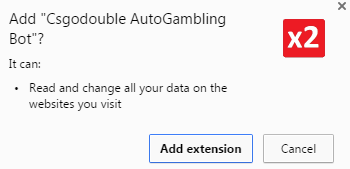 |
| 'Read and change all your data on the websites you visit' |
Other examples are:
CSGODouble Theme Changer
CS:GO Double Withdraw Helper
Csgodouble AutoGambling Bot
Improved CSGODouble
Instead of being able to change your CS:GO Double theme, your items from your inventory are getting stolen; instead of trading with X or Y person you trust, the items go to the scammer rather than whoever you're trading with:

All the addons he made can be found here. You can report them to Google as well by clicking 'Report Abuse' > 'Malware'. Note: some of them are still in the store despite several reports.
Update (20/01): all mentioned extensions are now removed from the Chrome Web Store.
76561198254328724 is the Steam ID of the scammer, who currently has a/is on trade probation; which means they recently had a trade ban removed.

Update (20/01): 'Delta' is now trade banned (again):

You can find his Steam profile here and his SteamRep profile here. (SteamRep is "a non-profit site that partners with community administrators to improve the safety of game-related trading.")
Disinfection
As opposed to actual SteamStealers, this one's pretty easy to disinfect or remove, as you can simply remove the extension(s) from Chrome:

In this example:

You may read more about installing, managing and removing extensions here. If you're having problems removing one of the extensions, you can also try resetting your Chrome browser.
Prevention
Does it look suspicious? Does it sound too good to be true? Don't install it!
For more prevention tips on securing your Steam account, see my earlier post about SteamStealers here.
Steam also has a FAQ set up in regards to: Spyware, Malware, Adware, or Virus Interfering with Steam
Conclusion
SteamStealers are (unfortunately) nothing new. Criminals are getting craftier and better in attempting to steal items or account credentials (along with other credentials) from unsuspecting users.
As opposed to actual malware or SteamStealers being loaded on your machine, this time it's a browser extension - thus be wary of anything that looks too good to be true and think twice
before you install anything (whether that be an extension, a 'screensaver' or images that look like you ;) ).
Follow the prevention tips above to stay safe. For any questions or feedback, don't hesitate to comment.
Sunday, 10 January 2016
Security Predictions 2016
Since everyone's doing it, here are some of my security predictions for 2016.
- More ransomware
- More misuse of the word 'CryptoLocker' (this ransomware died somewhere in 2014)
- More malware
- More misspellings of malware ('mallware', 'maleware', etc.)
- More IoT devices (Internet of Things)
- More ransomware or other malware for IoT devices
- More database/company breaches
- More spam, phishing, etc.
- More (ATM) skimming
- More nation-state malware
- More governments spying on their citizens
- More privacy concerns
- ...
Essentially: more of the same. I also suspect 2016 the year of more nation-state malware to be discovered/uncovered. And of course more encrypting ransomware (aka 'cryptoware') as it's still a succesful recipe. As long as people pay the ransom, they will keep bringing out new & improved versions/variants.
More security predictions (and probably more explained in depth or simply better ones) can be found by performing a search with your favorite search engine.
May you have a safe, malware-free, privacy-friendly 2016!
Friday, 13 November 2015
More ransomware shenanigans
Recently, an update of the infamous CryptoWall ransomware (or cryptoware) was released - you can read more about that particular ransomwere here: CryptoWall 4.0 released with new Features such as Encrypted File Names
Additionally, another ransomware variant has made a return, read more about that one here:
“Offline” Ransomware Encrypts Your Data without C&C Communication
And let's not forget about this one either: Chimera Ransomware focuses on business computers
Did I mention yet there's ransomware for Linux as well? Have a look at Linux.Encoder.1 while you're at it.
... But wait, there's more! You've guessed it, yet another ransomware variant has returned. I wonder what's going on these days, the (cyber)criminals seem to get even more competitive.
Lawrence Abrams over at Bleeping Computer recently wrote an article about the variant we have here as well, as we have caught an updated variant of Poshcoder or Poshkoder or Power Worm:
Shoddy Programming causes new Ransomware to destroy your Data
Moving on to the infection vector and process:

Kan du kontrollera den bifogade filen och låt mig veta vad du tycker? Tack

I just got this document, could you please check it and get back to me? Thanks
Email headers indicate:
Received: from techdallas.xyz (45.63.12.192.vultr.com [45.63.12.192])
45.63.12.192 - IPvoid - Whois
 |
| IP location: United States (VirusTotal) |
Attached is a file called Bilaga.doc or Document.doc. Other variations are possible, depending on the language (in this case either Swedish or English).
Let's see what's inside Bilaga.doc:
 |
| Ole10Native is in fact a VBS file |
As you can see, there's an ObjectPool present, containing an Ole native file. The former contains storages for embedded OLE objects. In this case, it's containing a VBS file:

The VBscript uses Powershell with certain flags or parameters to download a file to the %TEMP% folder and execute it:
(Note that by default PowerShell is configured to prevent the execution of PowerShell scripts on Windows systems)
- -WindowStyle hidden: don't display anything to the user (set WindowStyle as hidden)
- -ExecutionPolicy Bypass: no scrips are blocked, neither are there any warnings or prompts
- -nologo: starts the PowerShell console without displaying the copyright banner
- -noprofile: tells PowerShell to not load profile (user) scripts
You can find a tad more information on these commands here.
But what is the user seeing? Opening the Word document, there's another, clickable 'document':
 |
| Clicking the icon, warning message from Word |
 |
| Decoy message |
Then nothing happens, except in the background:
 |
| PowerShell download & running the malware |
Another PowerShell script (.ps1 file) is being executed, which will start encrypting files with the following extensions:
"*.pdf","*.xls","*.docx","*.xlsx","*.mp3","*.waw","*.jpg","*.jpeg","*.txt","*.rtf","*.doc","*.rar","*.zip","*.psd","*.tif","*.wma","*.gif","*.bmp","*.ppt","*.pptx","*.docm","*.xlsm","*.pps","*.ppsx","*.ppd","*.eps","*.png","*.ace","*.djvu","*.tar","*.cdr","*.max","*.wmv","*.avi","*.wav","*.mp4","*.pdd","*.php","*.aac","*.ac3","*.amf","*.amr","*.dwg","*.dxf","*.accdb","*.mod","*.tax2013","*.tax2014","*.oga","*.ogg","*.pbf","*.ra","*.raw","*.saf","*.val","*.wave","*.wow","*.wpk","*.3g2","*.3gp","*.3gp2","*.3mm","*.amx","*.avs","*.bik","*.dir","*.divx","*.dvx","*.evo","*.flv","*.qtq","*.tch","*.rts","*.rum","*.rv","*.scn","*.srt","*.stx","*.svi","*.swf","*.trp","*.vdo","*.wm","*.wmd","*.wmmp","*.wmx","*.wvx","*.xvid","*.3d","*.3d4","*.3df8","*.pbs","*.adi","*.ais","*.amu","*.arr","*.bmc","*.bmf","*.cag","*.cam","*.dng","*.ink","*.jif","*.jiff","*.jpc","*.jpf","*.jpw","*.mag","*.mic","*.mip","*.msp","*.nav","*.ncd","*.odc","*.odi","*.opf","*.qif","*.xwd","*.abw","*.act","*.adt","*.aim","*.ans","*.asc","*.ase","*.bdp","*.bdr","*.bib","*.boc","*.crd","*.diz","*.dot","*.dotm","*.dotx","*.dvi","*.dxe","*.mlx","*.err","*.euc","*.faq","*.fdr","*.fds","*.gthr","*.idx","*.kwd","*.lp2","*.ltr","*.man","*.mbox","*.msg","*.nfo","*.now","*.odm","*.oft","*.pwi","*.rng","*.rtx","*.run","*.ssa","*.text","*.unx","*.wbk","*.wsh","*.7z","*.arc","*.ari","*.arj","*.car","*.cbr","*.cbz","*.gz","*.gzig","*.jgz","*.pak","*.pcv","*.puz","*.r00","*.r01","*.r02","*.r03","*.rev","*.sdn","*.sen","*.sfs","*.sfx","*.sh","*.shar","*.shr","*.sqx","*.tbz2","*.tg","*.tlz","*.vsi","*.wad","*.war","*.xpi","*.z02","*.z04","*.zap","*.zipx","*.zoo","*.ipa","*.isu","*.jar","*.js","*.udf","*.adr","*.ap","*.aro","*.asa","*.ascx","*.ashx","*.asmx","*.asp","*.indd","*.asr","*.qbb","*.bml","*.cer","*.cms","*.crt","*.dap","*.htm","*.moz","*.svr","*.url","*.wdgt","*.abk","*.bic","*.big","*.blp","*.bsp","*.cgf","*.chk","*.col","*.cty","*.dem","*.elf","*.ff","*.gam","*.grf","*.h3m","*.h4r","*.iwd","*.ldb","*.lgp","*.lvl","*.map","*.md3","*.mdl","*.mm6","*.mm7","*.mm8","*.nds","*.pbp","*.ppf","*.pwf","*.pxp","*.sad","*.sav","*.scm","*.scx","*.sdt","*.spr","*.sud","*.uax","*.umx","*.unr","*.uop","*.usa","*.usx","*.ut2","*.ut3","*.utc","*.utx","*.uvx","*.uxx","*.vmf","*.vtf","*.w3g","*.w3x","*.wtd","*.wtf","*.ccd","*.cd","*.cso","*.disk","*.dmg","*.dvd","*.fcd","*.flp","*.img","*.iso","*.isz","*.md0","*.md1","*.md2","*.mdf","*.mds","*.nrg","*.nri","*.vcd","*.vhd","*.snp","*.bkf","*.ade","*.adpb","*.dic","*.cch","*.ctt","*.dal","*.ddc","*.ddcx","*.dex","*.dif","*.dii","*.itdb","*.itl","*.kmz","*.lcd","*.lcf","*.mbx","*.mdn","*.odf","*.odp","*.ods","*.pab","*.pkb","*.pkh","*.pot","*.potx","*.pptm","*.psa","*.qdf","*.qel","*.rgn","*.rrt","*.rsw","*.rte","*.sdb","*.sdc","*.sds","*.sql","*.stt","*.t01","*.t03","*.t05","*.tcx","*.thmx","*.txd","*.txf","*.upoi","*.vmt","*.wks","*.wmdb","*.xl","*.xlc","*.xlr","*.xlsb","*.xltx","*.ltm","*.xlwx","*.mcd","*.cap","*.cc","*.cod","*.cp","*.cpp","*.cs","*.csi","*.dcp","*.dcu","*.dev","*.dob","*.dox","*.dpk","*.dpl","*.dpr","*.dsk","*.dsp","*.eql","*.ex","*.f90","*.fla","*.for","*.fpp","*.jav","*.java","*.lbi","*.owl","*.pl","*.plc","*.pli","*.pm","*.res","*.rsrc","*.so","*.swd","*.tpu","*.tpx","*.tu","*.tur","*.vc","*.yab","*.8ba","*.8bc","*.8be","*.8bf","*.8bi8","*.bi8","*.8bl","*.8bs","*.8bx","*.8by","*.8li","*.aip","*.amxx","*.ape","*.api","*.mxp","*.oxt","*.qpx","*.qtr","*.xla","*.xlam","*.xll","*.xlv","*.xpt","*.cfg","*.cwf","*.dbb","*.slt","*.bp2","*.bp3","*.bpl","*.clr","*.dbx","*.jc","*.potm","*.ppsm","*.prc","*.prt","*.shw","*.std","*.ver","*.wpl","*.xlm","*.yps","*.md3","*.1cd"
As you can see, it has covered quite a lot of extensions. Nathan Scott from Bleeping Computer provided an image with a great explanation on what the script does:
 |
| (Source) |
In the version I saw, the PowerShell scripts were slightly different, in fact an 'improved version'.
After encrypting all your files, it will drop an HTML file (named DECRYPT_INSTRUCTION.html) on the root of all your folders which contains the following message:
 |
| Ransom message - you may need to pay up to $ 1000 |
It generates your #UUID by the following simple PowerShell command:
Get-wmiobject Win32_ComputerSystemProduct UUID
When visiting said Onion (Tor) link:
 |
| Unlock message |
Difference here from the version of October is that they also offer to decrypt 1 file, as proof they can actually decrypt all your files again. Unfortunately, the encryption fails horribly (for example, no extension is appended) and your files will be unrecoverable. For more information, see here.
- Don't open attachments from unknown senders - ever.
- Install an antivirus and keep it up-to-date and running. Enable the option to scan Compressed Files.
- Consider disabling Windows Script Host. You can use my tool, Rem-VBSworm with option D for example.
- Alternatively, you can install Analog X's Script Defender, which will block these scripts (JS, VBS, ...) as well.
- Consider disabling PowerShell if you don't need or use it. There are two possible options:
Note that if you have a company laptop, you should inform with your network administrator first. - Improve security for your Microsoft Office package. (Word, Excel, ...)
This means disabling ActiveX, disabling macros and blocking external content. Useful links:
Enable or disable ActiveX controls in Office documents
Enable or disable macros in Office documents
Block or unblock external content in Office documents - As with all ransomware cases: take backups!


Some time ago, I did a Q&A on ransomware, which also included several general tips on how to prevent (ransomware and other) malware. You can find and read those tips here.
Disinfection
- Identify and kill malicious processes (use Task Manager for example). In this specific case:
winword.exe, wscript.exe, powershell.exe - Run a full scan with your installed antivirus product.
- Run a full scan with another antivirus and/or antimalware product.
- In a company: unplug your network cable & warn your network administrator immediately!
Conclusion
Ransomware is far from dead (that is, encrypting ransomware or cryptoware, the "old" ransomware isn't very much around anymore), thus it's important to take preventive measures as outlined above.
You may find IOCs (Indicators Of Compromise) as usual on AlienVault's OTX.
Resources
Bleeping Computer - Shoddy Programming causes new Ransomware to destroy your Data
Microsoft - More Powerful Ways to Launch Windows PowerShell
Microsoft - Object Linking and Embedding (OLE)
Microsoft - ObjectPool Storage
Trend Micro - Ransomware Now Uses Windows PowerShell
Acknowledgments
Thanks to my colleague Ville from Panda Security Sweden for alerting me about this incident and Lawrence & Nathan over at Bleeping Computer for their already available information.
Tuesday, 10 November 2015
A quick look at a signed spam campaign
I noticed the following tweet pass by on Twitter:
Just received my 1st-ever digitally signed piece of spam. The ribbon is bound to entice someone 2 click on the email pic.twitter.com/470TpdaPDE— Robert (Роберт) (@RobertIdAu) November 9, 2015The mail received is as follows:
 |
| Spam but digitally signed |
As Robert correctly notes, since the mail is digitally signed, it may entice people more to open the attachment and get infected. In case you're wondering, the key id of the certificate is as follows:
FE:22:B7:24:E3:4F:27:D9:05:E0:CC:B8:BD:DE:F4:8D:23:FD:2F:D9 (copy of cert on Pastebin)
Issuer: C=IT, O=DigitPA, OU=Ufficio interoperabilita' e cooperazione, CN=DigitPA CA1
 |
| Signature details. S/MIME message format |
Both first and second mail are coming from: 175.156.221.127 - IPvoid - Whois (DomainTools)
 | |||
| IP location: Singapore (VirusTotal) |
On to the attachment (the .xml file is harmless):
 |
| "recalculation.zip" attached |
Hello
This recalculation of payments for the last month.
I remind you of your debt 3148,48 AUD.
Please pay as soon as possible.
The ZIP file contains 2 files: recalculation_77979.pdf.js & info_9455.txt. The TXT file just contains the name of the first file, which tries to hide as a PDF file but is in fact JavaScript (JS).
 |
| Part of the JavaScript |
You can find the original JavaScript on Pastebin. You can also find the decoded base64 here and the final obtained JavaScript here. In the final JavaScript, you'll see it downloads a file and renames it to a random filename, then executes it:
 |
| Download |
 |
| Run |
It fetches a file from: 203.255.186.156 - IPvoid - Whois (DomainTools)
 |
| IP location: Korea (VirusTotal) |
The eventual payload may be Andromeda/Gamarue, which will make your machine part of a botnet. Some information on the dropped DLL file (this is all static analysis):
Meta-data
==================================================================
File: 28236726.dll
Size: 495630 bytes
Type: PE32 executable for MS Windows (DLL) (GUI) Intel 80386 32-bit
MD5: 934df5b173790da14ef3a817ec1fc422
SHA1: e90b6e45f255350d0fd4cba361a09ad5d8271af1
ssdeep: 12288:GysxmAb/DC7BfWLc9ivHsegWDhNSKDWrV5rJfT:jo768wAAExDoPr9
Date: 0x429CE7C3 [Tue May 31 22:40:03 2005 UTC]
EP: 0x1000bddb .text 0/5
CRC: Claimed: 0x0, Actual: 0x83498 [SUSPICIOUS]
Packers: Armadillo v1.xx - v2.xx
 |
| Functions in our DLL file |
You may also find the file on VirusTotal, SHA1 hash: e90b6e45f255350d0fd4cba361a09ad5d8271af1
There's also an analysis available by Reverse.it (Hybrid Analysis) on Windows 7 32bit & Windows 7 64bit. Feel free to perform any additional research on it, let me know if you find something interesting or should you find out exactly which kind of malware this is.
Just as a note, while all that is happening in the background, a decoy PDF file gets opened as well, as to not raise suspicion:
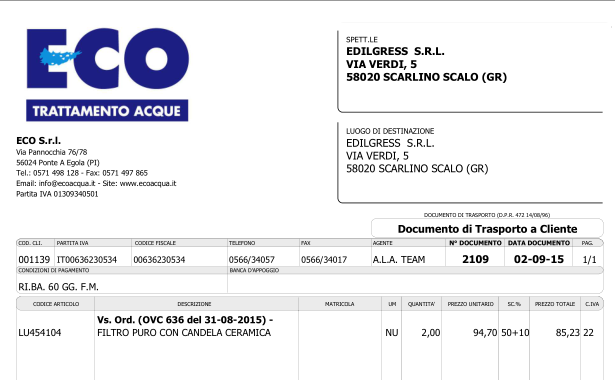 |
| Decoy PDF document (not malicious) |
Prevention
For administrators:
- Sender's end: Create an SPF record, as to prevent sender address forgery. More on SPF here.
- Receiver's end: Turn on SPF checking on your mailserver.
- If possible, turn on full support for DMARC. More on DMARC here.
- Check that only your mailserver may access the WAN (or RED) on port 25. Configure this in your firewall.
- Check that you use strong passwords for your Domain Controller server(s).
- Check that antivirus is installed, up-to-date and running on all workstations. (if applicable)
- If not needed, you can disable Windows Script Host (WSH), as it's needed for JavaScript to run locally. Read how to do that here.
For endusers:
- Don't open attachments from unknown senders - ever.
- Install an antivirus and keep it up-to-date and running. Enable the option to scan Compressed Files.
- Preferably, see that your antivirus has a firewall as well, to prevent unauthorised access.
- Consider disabling Windows Script Host. You can use my tool, Rem-VBSworm with option D for example.
- Alternatively, you can install Analog X's Script Defender, which will block these scripts (JS, VBS, ...) as well.
Disinfection
As usual:
- Look for suspicious Run keys (find locations here) and delete the associated file(s).
In our case, all files were dropped in the %TEMP% folder. Also, don't forget to look for rundll32.exe processes, as the payload was a DLL file. More information on rundll32 here. - Run a full scan with your installed antivirus product.
- Run a full scan with another antivirus and/or antimalware product.
- In a company: warn your network administrator immediately!
Conclusion
Now how was that mail sent out? There's no sure way of telling - it's possible the company is compromised (by either malware or an attacker), there's no SPF record, the certificate has been stolen (unlikely but not impossible), .... Most likely, a machine is infected by a spambot.
Note that with PEC (Posta Elettronica Certificata), a user can send a signed message even when the mailserver is not compromised. PEC means the server signs a message to ensure timestamp and sender, not content. More on PEC here (ITA) or here (EN). See also point 2 and 4 in the Prevention tips above.
I've contacted all related parties and hoping I'll get a reply soon, or at the very least they will perform some analysis and cleaning.
Follow the prevention tips above to stay safe. If you're looking for Indicators of Compromise (IOCs), they can be found as usual on AlienVault's OTX.
Subscribe to:
Posts (Atom)
Display Color Calibration tool DCCW and UAC bypasses
In today's post we'll look at yet another way to bypass UAC using the Display Color Calibration tool, hereafter referred to as ...

-
 In this post we'll be focusing on a certain kind of malware: Linux/Xor.DDoS (also known as DDoS.XOR or Xorddos). As usual, we'll br...
 -
 In today's post we'll look at yet another way to bypass UAC using the Display Color Calibration tool, hereafter referred to as ...
 -
 Spam runs never get old. Whether you have received a package from UPS, FedEx or even PayPal notifications, they either lead you to (poorly c...