Friday, 22 July 2016

EU cookie law and fake Chrome extensions


When a website is serving up malware to unsuspecting visitors, it's often not too hard to find the culprit. In some cases however, it takes a bit more digging. When visiting a (not named on request) specific website, you're presented with the following message:

Your browser contains MALWARE. You have to install Chrome Malware Removal tool


After some digging on the site, nothing was suspicious at first sight. However... It did have a EU cookie law pop-up/consent:


The script behind it is as follows:


... Which contains:


Both scripts contain the warning message and a redirect to the Google Chrome store:

lang = 'en';
var msg = 'Your browser contains MALWARE. You have to install Chrome Malware Removal tool.';
if (lang == 'es') msg = "Su navegador contiene malware. Usted tiene que instalar la herramienta de eliminación de malware Chrome.";
if (lang == 'it') msg = "Il tuo browser contiene malware. È necessario installare strumento di rimozione malware Chrome.";
if (lang == 'fr') msg = "Votre navigateur contient MALWARE. Vous devez installer l'outil de suppression de logiciels malveillants Chrome.";
if (lang == 'pt') msg = "Seu navegador contém malware. Você tem que instalar o Ferramenta de remoção Chrome Malware.";
if (lang == 'de') msg = "Ihr Browser enthält MALWARE. Sie müssen Chrome Malware Removal Tool zu installieren.";
if (lang == 'ru') msg = "Ваш браузер содержит вредоносный код. Вы должны установить расширение для блокировки вредоносного кода.";
if (lang == 'gr') msg = "Το πρόγραμμα περιήγησής σας περιέχει κακόβουλο λογισμικό. Θα πρέπει να εγκαταστήσετε το Chrome Malware εργαλείο αφαίρεσης.";

You can find both scripts on Pastebin here and here.


Chrome Malware Removal Tool


At time of writing, it has over 22,000 users. You can find the malicious extension here.

UPDATE 27/07: the malicious extension has now been removed from the Chrome store.

To remove an extension from Chrome:


It is not clear whether the site offering the cookie consent script is hacked, or is in on the ploy.

You can find indicators (for what it's worth) as always on the AlienVault OTX.


Conclusion

Stay clear from scripts offered by 3rd party EU cookie consent websites and rather create your own pop-up. A trustworthy site to create this for example is cookie-script.

As always when managing a website, keep your CMS (if any) updated as well as any plugins that may be running.

You can find more tips on how to prevent, find (and remove) malicious scripts on your website here.

Tuesday, 10 May 2016

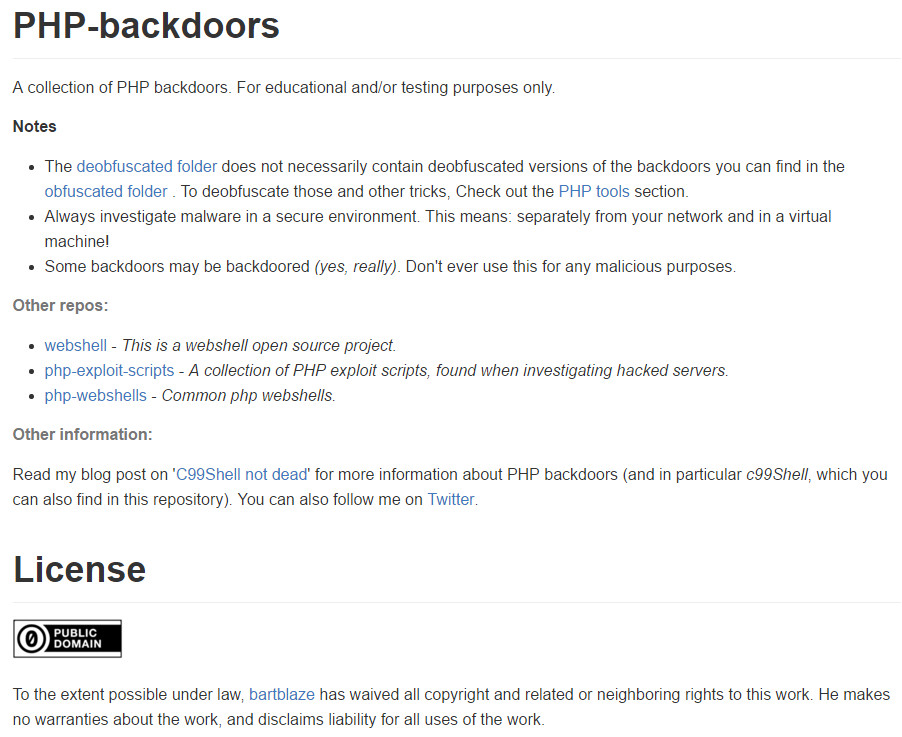
A collection of PHP backdoors


Just a quick post to announce I've set up a GitHub repository with a collection of PHP backdoors for educational and/or testing purposes only:


Feel free to check it out and/or contribute here:
https://github.com/bartblaze/PHP-backdoors

The repository will be updated continuously and gradually.

If you're interested in analysing a PHP backdoor, check out my post on PHP/C99shell:
C99Shell not dead


Additionally, find tools to deobfuscate PHP backdoors here:
PHP tools

Wednesday, 4 May 2016

SteamStealer IP visualisations


Just for fun I decided to visualise all SteamStealer IPs I've encountered (till now). They are hosting multiple fake screenshot websites, fake voice communication software, fake streaming websites, fake Steam websites and others. They may also be a C&C for the malware, or fake gambling/lottery websites.

Any additional information can also be found on my blog:
Malware spreading via Steam chat

Additionally, be sure to read the paper I wrote with Santiago from Kaspersky about SteamStealers here: The evolution of malware targeting Steam accounts and inventory


Now for the fun part:


View SteamStealer IPs in a full screen map


Alternatively, check out the following map and stats:


a

CountryCount
Russian Federation163
United Kingdom19
Netherlands18
United States14
Germany9
Ukraine6
France6
Poland4
Romania1
Italy1
Czech Republic1
Canada1
Australia1
Belarus1
Belize1
Kazakhstan1
Virgin Islands, British1
Spain1
Moldova, Republic of1


As you can see, most of them are hosted in Russia; while the United Kingdom and The Netherlands rank second and third respectively.

Note: CloudFlare is gaining popularity in 'hiding' the real server IP address. CloudFlare IPs are not included.

That's about it, hope you enjoyed! Please find below tools used to create the mapping.


Resources

Geomapping:
Batchgeo
GIPC

Data:
SteamStealer IPs IOCs

Wednesday, 20 April 2016

Nemucod ransomware information


This is a quick post on the recent Nemucod ransomware. Nemucod is (normally) a downloader which uses JavaScript  JScript (thanks Katja) to enter an unsuspecting user's machine and download additional malware (depends on campaign usually).

There's a blog post by Fortinet which explains Nemucod ransomware, so I'm not going to repeat much here: Nemucod Adds Ransomware Routine

It came to our attention that a new, rather peculiar version of Nemucod has been recently landing on users. Nemucod is a well-known JavaScript malware family that arrives via spam email and downloads additional malware to PCs.

This particular campaign is using the lure of a court appeal to spread:


The mail reads:

Notice to Appear,
You have to appear in the Court on the April 22.Please, prepare all the documents relating to the case and bring them to Court on the specified date.Note: If you do not come, the case will be heard in your absence.
The Court Notice is attached to this email.
Yours faithfully,Brian Snider,District Clerk.


It seems Nemucod ransomware got another update, as it now uses 7-zip to actually encrypt the files.

Another change is the slight drop in price. Whereas before it was 0.60358 bitcoins ($267.14 or €236.43), it's now 0.49731 bitcoins ($220.11 or €194.80).

New message reads:

Nemucod ransomware message


Nemucod encrypting a whole plethora of filetypes, appending the .crypted extension


Disinfection

If you have opened a .JS file (JScript file) from an unknown sender, open Task Manager immediately and stop all the following processes (at least in this version of Nemucod):

a0.exe (actually 7-zip disguised)
a1.exe
a2.exe
cmd.exe
wscript.exe


The faster you do this, the less files will be encrypted. Run a scan with your antivirus program and a scan with another antivirus program to verify the malware has been removed.

Note: It's always useful to keep a copy of the ransomware note handy, as it's easier to identify the ransomware and if it can be decrypted.


Decryption

I'm only briefly reporting on this for those in need, but currently, the known decryptors are suited for this version. However, Fabian from Emsisoft is already working hard to make a decryptor available, so please have patience!

If you have an older version of Nemucod, you can try one of either decryptors:
Emsisoft Decrypter for Nemucod 
nemucod_decrypter (you will need to install Python for this)

You can also try restoring files with Shadow Explorer. (alternate link)

For more information, please visit the following Bleeping Computer topic
.crypted Ransomware (Nemucod) - Decrypt.txt Support and Help Topic


Prevention

In particular for Nemucod, don't open any JScript/JavaScript files from unknown senders.

For more tips on ransomware prevention, be sure to check out this page I've set up:
Ransomware Prevention


Conclusion

Same as with all malware: don't open attachments from unknown senders!

Please find below IOCs and additional resources.


Resources

.crypted Ransomware (Nemucod) - Decrypt.txt Support and Help Topic
ID ransomware
JavaScript-toting spam emails: What should you know and how to avoid them?
JScript
Nemucod ransomware IOCs
Ransomware overview
Ransomware Prevention
TrojanDownloader: JS/Nemucod

Thursday, 24 March 2016

Ransomware prevention


Very short blog post to let you know I now also have an English version of my article 'preventie van ransomware', on how to prevent ransomware.

You can find it as a page (see top of my blog) or here:
Ransomware Prevention

Translations are available in Dutch (Nederlands) and French (français).

Thanks to @WawaSeb for the French translation. If you would like to translate this page in your own language, feel free to do so and send me the link so it can be added.

Tuesday, 15 March 2016

All your creds are belong to us


In the past, I've blogged about Steam Stealers (malware that specifically targets gamers and users of Valve's platform) before (see 1, 2), but this blog post will be a bit different.

Working together with Santiago Pontiroli, Security Researcher at Kaspersky Lab Global Research and Analysis Team, we've written a paper on these infamous Steam Stealers.

Check out our blog post here or directly download the PDF from here.

Enjoy!

Sunday, 21 February 2016

Preventie van ransomware


This blog post will be fully in Dutch. If you'd like to read English material, be sure to check out my Q&A on ransomware. A translation will also be available in one of the next days.


Ransomware heeft in principe geen introductie meer nodig, maar kortgezegd zal deze specifieke soort malware (bijna) al je bestanden encrypteren en een bepaald bedrag vragen (tegenwoordig vaak in Bitcoin) om terug toegang tot al je bestanden te verkrijgen.

Andere benamingen: CryptoLocker, cryptoware, encrypting ransomware.

Deze blog post is opgesplitst in twee luiken: 1 voor thuisgebruikers, 1 voor bedrijven. De meeste tips zijn echter ook uitwisselbaar en kunnen naar believen worden toegepast.

Tot slot worden ook enkele tools ter beschikking gesteld als aanvulling alsook extra resources.


Thuisgebruikers


  • Gebruik, afhankelijk van de mailclient, een degelijke anti-spam filter. In zo goed als alle online diensten (bv. Outlook.com, Gmail, ...) wordt deze reeds standaard aangeboden.
  • Open nooit een bijlage van een onbekende afzender. 
  • Blokkeer de executie van macro's in je Office-pakket. 
  • Schakel Windows Script Host uit. Gebruik hiervoor bijvoorbeeld optie D in mijn tool.
  • Schakel PowerShell uit. Dit kan via Configuratiescherm > Programma's >
    Windows Onderdelen in- of uitschakelen.
  • Gebruik een degelijke anti-virus/anti-malware en firewall oplossing en houdt deze up-to-date.
  • Verwijder alle oude Java versies, of verwijder Java volledig indien mogelijk.
  • Verwijder SilverLight indien mogelijk.
  • Installeer steeds alle relevante Windows updates.
  • Activeer click-to-play voor Flash in je browser. Dit hangt af van je browser zelf.
  • Installeer NoScript of vergelijkbaar in je browser.
  • Installeer een adblocker in je browser, bijvoorbeeld uBlock Origin.
  • Er is eveneens een freeware programma beschikbaar, dat heel wat zaken voor je automatisch gaat instellen (zoals bekende locaties waarvan ransomware zich start gaat monitoren) genaamd CryptoPrevent.


Last but not least, de twee belangrijkste punten:

  • Denk altijd twee keer na alvorens een link of bijlage aan te klikken/te openen.
  • Neem geregeld backups! Vergeet niet om na de backup je externe harde schijf los te koppelen. Wees ook voorzichtig met backups naar de cloud - eenmaal je merkt dat je geïnfecteerd bent, verbreek meteen de netwerkverbinding en/of sluit het toestel af om de schade te beperken.

    Test ook of de backup geslaagd is en herstel enkele (test)bestanden. Een backup is altijd de beste optie hier om bestanden terug te zetten, maar dan moet je ook weten dat deze gelukt is.


Bedrijven

Ook in bedrijven zijn vele van de bovenstaande tips van toepassing. Het overgrote deel hiervan is ook perfect toepasbaar via Group Policies (GPO).

Enkele aanvullingen:


  • Gebruik steeds sterke wachtwoorden voor je servers (ongeacht domain controller of fileserver, etc...).
  • Installeer steeds alle relevante Windows updates.
  • Schakel indien mogelijk toegang tot RDP uit. Indien dit niet mogelijk is, gebruik een goede firewall oplossing (hardwarematig) met VPN. Gebruik ook hier sterke wachtwoorden/authenticatie.
  • Schakel administrator-rechten uit voor gewone gebruikers. De meeste gebruikers met een bedrijfslaptop zouden in theorie geen programma's of dergelijke moeten installeren.
  • Schakel via GPO het gebruik van macro's in Office uit indien mogelijk (of sta enkel macro's toe die digitaal ondertekend zijn), schakel Windows Script Host uit en verplicht het gebruik van antivirus.
  • Installeer dus ook antivirus op alle toestellen in het netwerk en zeker voor gebruikers die hun toestel mee naar huis (mogen) nemen.
  • Indien aanwezig, activeer de optie om gearchiveerde bestanden te laten scannen door de antivirus.
  • Installeer een degelijke anti-spam oplossing en verbiedt het gebruik van bijlagen met gevaarlijke extensies (.exe, .scr, ....) maar blokkeer ook JavaScript bestanden (.js).
  • Verifieer de file sharing permissies van je gebruikers. Wees hier zo efficiënt mogelijk in. Een gebruiker tot groep X heeft niets te zoeken op de share van groep Y? Beperk de toegang. (maak bijvoorbeeld gebruik van ACLs)
  • Informeer gebruikers over de gevaren van het openen van bijlagen van een onbekende afzender of het zomaar losweg klikken op een link in een onbekende mail. Heb eveneens een actieplan klaar voor moest er zich toch een malware-infectie voordoen (ransomware of anders).
  • Gebruik policies om EXE bestanden vanuit bepaalde locaties niet toe te staan. Link.


Last but not least, de twee belangrijkste punten:
  • 'Failing to prepare is preparing for failure'. Preventie is belangijker dan desinfectie. 
  • Neem geregeld backups! Vergeet niet om na de backup je externe harde schijf los te koppelen. Wees ook voorzichtig met backups naar de cloud - eenmaal je merkt dat je geïnfecteerd bent, verbreek meteen de netwerkverbinding en/of sluit het toestel af om de schade te beperken.

    Test ook of de backup geslaagd is en herstel enkele (test)bestanden. Een backup is altijd de beste optie hier om bestanden terug te zetten, maar dan moet je ook weten dat deze gelukt is.


Tools

Browser:
Gebruik bij voorkeur Internet Explorer of Edge niet - andere browsers zijn namelijk meer 'customizable', wat wil zeggen dat je met een add-on of extensie wat extra bescherming kan instellen.
(vergeet echter niet om deze extensies ook up-to-date te houden)


Activeer click-to-play voor plugins (zoals Flash of Silverlight)
uBlock Origin (Chrome)
uBlock Origin (Firefox)
NoScript

Blokkeer de uitvoering van scripts:
Remediate VBS Worm
Script Defender

CryptoPrevent Malware Prevention:
https://www.foolishit.com/cryptoprevent-malware-prevention/

Java:
Waarom moet ik oudere Java-versies van mijn computer verwijderen?

PowerShell uitschakelen:


Resources

Backups:
Back-ups maken en terugzetten: veelgestelde vragen

Office:
ActiveX-besturingselementen in Office-documenten in- of uitschakelen
Externe inhoud in Office-documenten blokkeren of deblokkeren
Macro's in Office-bestanden in- of uitschakelen

Gebruik makend van GPO:


Identificeer ransomware:
ID Ransomware

Ransomware overzicht:
Ransomware Overview

No More Ransom project (decrypters etc.):
The No More Ransom Project

Ransomware extra informatie:
Ransomware: a Q&A

Windows File Sharing:
Understanding Windows Server 2008 File and Folder Ownership and Permissions

Windows Script Host (WSH):
Disabling Windows Script Host

Display Color Calibration tool DCCW and UAC bypasses

In today's post we'll look at yet another way to bypass UAC using the Display Color Calibration tool, hereafter referred to as ...